Syllabus:
Hibernate (HB): Introduction, architecture, HB with IDE, HB Log4j, inheritance mapping, HB mapping, transaction management, HB query language, HB criteria query language, named query, HB caching, integration, HB lifecycle
Spring: Introduction, modules, spring with IDE, dependency injection methods, spring AOP, spring Jdbc template, spring ORM, SPEL, MVC tag library, applications, spring remoting, spring OXM, spring web, security models, spring boot, spring with angular
MDU PYQs:
Hibernate
-
Hibernate Short Questions
- Define Hibernate Lazy Collection (2023, 2.5 marks)
- Criteria query language (2024, 2.5 marks)
-
Hibernate Architecture & Components (2021, 2022) - HIGH PRIORITY
- Explain the architecture of Hibernate in detail. (2021, 2022, 15 marks)
-
Hibernate Query Languages & Features (2023, 2024)
- Explain Hibernate HQL and HCQL. (2023, 10 marks)
- Explain Hibernate Logging with Log4j. (2023, 5 marks)
- Describe Transaction Management Process in Hibernate. (2024, 7.5 marks)
- Explain inheritance mapping concept in Hibernate. (2024, 7.5 marks)
Spring
-
Spring Short Questions
- Spring AOP (2021, 2.5 marks)
- Spring framework (2022, 2.5 marks)
- Differentiate between Constructor and Setter Injection (2023, 2.5 marks)
-
Spring Core & Dependency Injection (2021, 2022, 2024) - HIGH PRIORITY
- Explain dependency injection methods in Spring. (2021, 2022, 2024, 7.5-15 marks)
-
Spring MVC (2023, 2024)
- Elaborate Spring MVC Tiles with the help of program. (2023, 15 marks)
- What is MVC tag library in spring? (2024, 7.5 marks)
Section 1 : Hibernate
1.1 : Introduction to Hibernate
✅ What is Hibernate?
- Hibernate is an open-source, lightweight Object-Relational Mapping (ORM) framework for Java.
- It simplifies the development of Java applications that interact with databases by mapping Java objects to database tables.
- Hibernate eliminates the need for writing complex SQL queries by providing a high-level abstraction for database operations.
- It is widely used in enterprise applications for its flexibility, scalability, and ease of use.
✅ Key Features of Hibernate
- ORM Framework: Maps Java objects to database tables and vice versa.
- Database Independence: Supports multiple databases (MySQL, Oracle, PostgreSQL, etc.) without changing code.
- HQL (Hibernate Query Language): A powerful query language similar to SQL but object-oriented.
- Caching: Supports first-level and second-level caching for improved performance.
- Lazy Loading: Loads data only when it is accessed, reducing memory usage.
- Transaction Management: Provides built-in support for managing database transactions.
- Integration: Easily integrates with other frameworks like Spring.
✅ Advantages of Hibernate
- Reduces boilerplate code for database operations.
- Database-independent, making applications portable.
- Provides built-in support for caching and transaction management.
- Simplifies complex joins and relationships with object-oriented queries.
- Automatically generates SQL queries based on object mappings.
- Supports advanced features like inheritance mapping and criteria queries.
✅ Disadvantages of Hibernate
- Steeper learning curve for beginners.
- May introduce overhead for simple applications.
- Debugging generated SQL queries can be challenging.
✅ Use Cases of Hibernate
- Enterprise applications with complex database interactions.
- Applications requiring database portability.
- Projects where reducing boilerplate code is a priority.
- Applications needing advanced caching and transaction management.
1.2 : Hibernate Architecture
PYQ: Explain the architecture of Hibernate in detail. (2021, 2022, 15 marks)
Hibernate's architecture is designed to provide a high-level abstraction for database operations. It consists of the following core components:
| Component | Description |
|---|---|
| Configuration | Reads hibernate.cfg.xml or annotations. Sets up database and mapping details. |
| SessionFactory | A factory for creating Session objects. It's a heavyweight, singleton object used across the app. |
| Session | Represents a single unit of work with the database. Maintains a first-level cache and is not thread-safe. |
| Transaction | Handles database transactions (begin, commit, rollback). Ensures ACID properties. |
| Query | Used to retrieve data using HQL (Hibernate Query Language) or native SQL. |
| Persistence Objects | Java POJOs mapped to database tables. Used to store and retrieve data. |
| First-level Cache | Default cache associated with a Hibernate session. Works automatically. |
| Second-level Cache | Optional cache shared across sessions. Boosts performance for repeated data access. |
| Database | The actual data source that Hibernate communicates with using JDBC. |
Mnemonic: Cats Sleep Through Quiet People For Days
✅ Hibernate Architecture Diagram
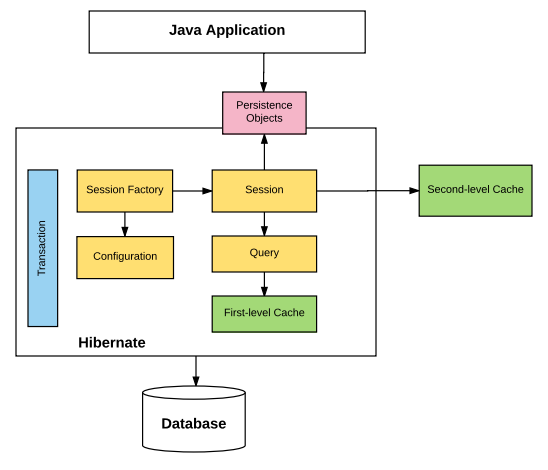
✅ Steps in Hibernate Workflow
- Configuration: Load settings from
hibernate.cfg.xmlor annotations. - SessionFactory Creation: Build a
SessionFactoryfrom the configuration. - Session Creation: Open a
Sessionto start interacting with the database. - Transaction Management: Begin a transaction using the
Transactionobject. - Database Operations: Perform CRUD operations via the
SessionorQuery. - Caching: Hibernate checks the first-level and second-level caches before hitting the database.
- Commit Transaction: Save all changes to the database.
- Close Session: Release the session and clear the first-level cache.
1.3 : Hibernate with IDE
Integrating Hibernate with an IDE (like Eclipse or IntelliJ IDEA) simplifies development by providing tools for configuration, code generation, and debugging.
✅ Steps to Set Up Hibernate in Eclipse
- Create a New Java Project: Open Eclipse and create a new Java project.
- Add Hibernate Libraries: Download Hibernate libraries and add them to the project's build path.
- Create Configuration File: Create
hibernate.cfg.xmlin thesrc/main/resourcesdirectory. - Create Entity Classes: Define Java classes representing database tables.
- Create DAO Classes: Implement Data Access Object (DAO) classes for database operations.
- Create Main Class: Implement the main class to test Hibernate functionality.
- Run the Application: Execute the main class to test database operations.
1.4 : Hibernate Log4j
PYQ: Explain Hibernate Logging with Log4j. (2023, 5 marks)
✅ What is Log4j?
- Log4j is a popular logging framework for Java applications that provides a flexible and efficient way to log messages.
- It allows developers to control the logging output and format, making it easier to debug and monitor applications.
- Log4j supports different logging levels (DEBUG, INFO, WARN, ERROR, FATAL) to categorize log messages.
- It can log messages to various outputs, including console, files, and remote servers.
✅ Why Use Log4j with Hibernate?
- Debug Hibernate Operations: View SQL queries generated by Hibernate.
- Track Application Flow: Monitor the flow of Hibernate operations.
- Error Analysis: Easily identify and fix issues in Hibernate applications.
- Performance Tuning: Analyze query execution time and optimize performance.
✅ Log Levels in Log4j
| Level | Description |
|---|---|
| TRACE | Most detailed information, typically used for debugging Hibernate mappings and operations. |
| DEBUG | Detailed information useful for debugging, shows generated SQL queries. |
| INFO | General information about the application's behavior. |
| WARN | Potentially harmful situations that don't prevent normal execution. |
| ERROR | Error events that might still allow the application to continue running. |
| FATAL | Very severe error events that likely lead to application termination. |
1.5 : Inheritance Mapping in Hibernate
PYQ: Explain inheritance mapping concept in Hibernate. (2024, 7.5 marks)
✅ What is Inheritance Mapping?
- Inheritance Mapping is the process of mapping an object-oriented inheritance hierarchy to database tables in Hibernate.
✅ Types of Inheritance Mapping Strategies in Hibernate
-Hibernate provides several strategies for mapping inheritance relationships to database structures.
| Strategy | Description | Advantages | Disadvantages |
|---|---|---|---|
| Table Per Class Hierarchy (Single Table) | All classes in hierarchy mapped to a single table | Simple, good performance | Many nullable columns, requires discriminator |
| Table Per Subclass (Joined Table) | Each subclass has its own table with a foreign key | Normalized structure | Requires joins for queries |
| Table Per Concrete Class | Each concrete class has its own table with all properties | No joins needed, simple queries | Duplicate columns, no polymorphic queries |
| Mapped Superclass | Base class properties included in subclass tables | Simple structure | Cannot query against superclass |
✅ 1. Table Per Class Hierarchy (Single Table)
- Uses a discriminator column to distinguish between different entity types
- All properties from all subclasses stored in a single table
@Entity
@Inheritance(strategy = InheritanceType.SINGLE_TABLE)
@DiscriminatorColumn(name = "emp_type")
public class Employee {
    @Id private int id;
    private String name;
}

@Entity
@DiscriminatorValue("MGR")
public class Manager extends Employee {
    private int teamSize;
}
✅ 2. Table Per Subclass (Joined Table)
- Each subclass has its own table with a foreign key to the parent table
- Common properties stored in the parent table
@Entity
@Inheritance(strategy = InheritanceType.JOINED)
public class Employee {
    @Id private int id;
    private String name;
}

@Entity
public class Developer extends Employee {
    private String language;
}
✅ 3. Table Per Concrete Class
- Each concrete class has its own table with all properties
- No relationships between tables
@Entity
@Inheritance(strategy = InheritanceType.TABLE_PER_CLASS)
public abstract class Employee {
    @Id private int id;
    private String name;
}

@Entity
public class Manager extends Employee {
    private int teamSize;
}
✅ 4. Mapped Superclass
- Base class is not an entity but its properties included in subclass tables
- Cannot be queried on its own
@MappedSuperclass
public abstract class Employee {
    @Id private int id;
    private String name;
}

@Entity
public class Developer extends Employee {
    private String language;
}
1.6 : Hibernate Mapping
✅ What is Hibernate Mapping?
- Hibernate Mapping refers to the process of mapping Java objects to database tables.
- Mapping can be done using XML files or annotations (JPA annotations).
✅ Types of Mapping in Hibernate
| Relationship | Description | Java Example |
|---|---|---|
| One-to-One | One record in a table is associated with exactly one record in another table | Employee <-> Address |
| One-to-Many | One record in a table is associated with multiple records in another table | Department <-> Employees |
| Many-to-One | Multiple records in a table are associated with one record in another table | Employees <-> Department |
✅ Basic Mapping Examples
- One-to-One:
- Maps a one-to-one relationship between two entities
@Entity
public class Employee {
    @Id private int id;

    @OneToOne(cascade = CascadeType.ALL)
    @JoinColumn(name = "address_id")
    private Address address;
}
- One-to-Many:
- Maps a one-to-many relationship between two entities
@Entity
public class Department {
    @Id private int id;

    @OneToMany(mappedBy = "department")
    private List<Employee> employees;
}
- Many-to-Many:
- Maps a many-to-many relationship between two entities
@Entity
public class Student {
    @Id private int id;

    @ManyToMany
    @JoinTable(name = "student_course")
    private List<Course> courses;
}
1.7 : Transaction Management in Hibernate
PYQ: Describe Transaction Management Process in Hibernate. (2024, 7.5 marks)
A transaction is a sequence of operations performed as a single logical unit of work. Transaction management ensures that all operations within a transaction are completed successfully or none at all.
✅ What is Transaction Management?
- A transaction is a unit of work that follows the ACID properties (Atomicity, Consistency, Isolation, Durability).
- Transaction Management in Hibernate ensures that a group of operations either all succeed or all fail together.
✅ ACID Properties
| Property | Description |
|---|---|
| Atomicity | A transaction is an atomic unit. Either all operations succeed or all fail. |
| Consistency | A transaction brings the database from one consistent state to another. |
| Isolation | Transactions are isolated from each other, preventing interference. |
| Durability | Once a transaction is committed, its effects persist even in case of system failure. |
✅ Transaction Management in Hibernate
Hibernate provides two ways to manage transactions:
- Local transactions - using Hibernate's native API and JDBC (most common)
- Global transactions - using JTA (Java Transaction API) for distributed transactions
✅ Steps for Transaction Management in Hibernate
- Create
SessionFactoryfrom configuration - Open a
Session - Begin a transaction using
session.beginTransaction() - Perform DB operations (save, update, delete)
- Commit or rollback the transaction
- Close the session
✅ Example Code
Session session = factory.openSession();
Transaction tx = null;

try {
    tx = session.beginTransaction();

    // Perform operations
    Employee emp = new Employee("John", "Developer");
    session.save(emp);

    tx.commit(); // Save changes
} catch (Exception e) {
    if (tx != null) tx.rollback(); // Undo if error
    e.printStackTrace();
} finally {
    session.close(); // Always close session
}
1.8 : Hibernate Query Language (HQL)
PYQ: Explain Hibernate HQL and HCQL. (2023, 10 marks)
✅ What is HQL?
- Hibernate Query Language (HQL) is an object-oriented query language similar to SQL but operates on Java objects instead of database tables.
- HQL is translated into SQL by Hibernate before execution.
✅ Why Use HQL?
- Object-Oriented: Works with Java objects and properties, not database tables and columns.
- Database Independent: The same HQL query works across different databases.
- Powerful: Supports advanced features like pagination, aggregation, and joins.
- Type Safety: Better type checking at compile time compared to SQL strings.
- Readable: More readable and maintainable than raw SQL.
✅ Basic HQL Queries
| Operation | HQL Example |
|---|---|
| Select All | "FROM Student" |
| Select with Where | "FROM Student WHERE name = 'John'" |
| Select Specific Properties | "SELECT s.id, s.name FROM Student s" |
| Ordering | "FROM Student ORDER BY name ASC" |
| Joins | "FROM Student s JOIN s.courses c" |
| Aggregation | "SELECT COUNT(s) FROM Student s" |
✅ Examples of HQL Queries
- Simple Query:
String hql = "FROM Student";
Query<Student> query = session.createQuery(hql, Student.class);
List<Student> students = query.list();
- Parameterized Query:
String hql = "FROM Student WHERE name = :name";
Query<Student> query = session.createQuery(hql, Student.class);
query.setParameter("name", "John");
List<Student> students = query.list();
- Pagination:
String hql = "FROM Student";
Query<Student> query = session.createQuery(hql, Student.class);
query.setFirstResult(10);  // Skip first 10 results
query.setMaxResults(20);   // Get next 20 results
List<Student> students = query.list();
- Joining Tables:
String hql = "SELECT s FROM Student s JOIN s.courses c WHERE c.name = :courseName";
Query<Student> query = session.createQuery(hql, Student.class);
query.setParameter("courseName", "Mathematics");
List<Student> students = query.list();
✅ HQL UPDATE and DELETE Operations
// Update operation
String hqlUpdate = "UPDATE Student SET name = :newName WHERE id = :id";
Query query = session.createQuery(hqlUpdate);
query.setParameter("newName", "Jane Doe");
query.setParameter("id", 1);
int rowsAffected = query.executeUpdate();

// Delete operation
String hqlDelete = "DELETE FROM Student WHERE id = :id";
Query query = session.createQuery(hqlDelete);
query.setParameter("id", 1);
int rowsAffected = query.executeUpdate();
Note: For UPDATE and DELETE operations, you must manually control transactions.
1.9 : Hibernate Criteria Query Language
PYQ: Explain Hibernate HQL and HCQL. (2023, 10 marks) PYQ: Criteria query language (2024, 2.5 marks)
✅ What is Criteria Query API?
Criteria Query API is a powerful and flexible way to create dynamic queries in Hibernate. It allows you to build queries programmatically using Java objects instead of writing HQL or SQL strings.
HCQL is particularly useful for:
- Dynamic Queries: Building queries based on user input or application logic.
- Type Safety: Compile-time checking of query parameters and types.
- Readability: More readable and maintainable than HQL for complex queries.
- Support for Joins: Easily create joins between entities.
- Pagination: Built-in support for pagination and sorting.
- Criteria API is part of the JPA specification and is available in Hibernate.
✅ Criteria API vs HQL
| Feature | Criteria API | HQL |
|---|---|---|
| Type Safety | Compile-time checking | Runtime checking |
| Dynamic Queries | Easy to build | More complex to construct |
| Readability | Less readable for complex queries | More readable for complex queries |
| Learning Curve | Steeper | Closer to SQL, easier to learn |
✅ Types of Criteria API
Hibernate offers two Criteria APIs:
- Legacy Criteria API (org.hibernate.Criteria)
- JPA Criteria API (javax.persistence.criteria)
✅ Legacy Criteria API Examples
// Basic query
Criteria criteria = session.createCriteria(Student.class);
List<Student> students = criteria.list();

// Adding restrictions
criteria.add(Restrictions.eq("name", "John"));

// Multiple conditions
criteria.add(Restrictions.and(
    Restrictions.gt("age", 18),
    Restrictions.like("name", "J%")
));

// Ordering and pagination
criteria.addOrder(Order.asc("name"));
criteria.setFirstResult(10);
criteria.setMaxResults(20);
✅ JPA Criteria API Examples
// Basic query
CriteriaBuilder cb = session.getCriteriaBuilder();
CriteriaQuery<Student> cq = cb.createQuery(Student.class);
Root<Student> root = cq.from(Student.class);
cq.select(root);

// With conditions
cq.select(root).where(cb.equal(root.get("name"), "John"));

// Multiple conditions
cq.select(root).where(cb.and(
    cb.greaterThan(root.get("age"), 18),
    cb.like(root.get("name"), "J%")
));

// Ordering and joins
cq.select(root).orderBy(cb.asc(root.get("name")));
Join<Student, Course> coursesJoin = root.join("courses");
1.10 : Named Query in Hibernate
✅ What is a Named Query?
- Named Queries are predefined, reusable HQL or SQL queries with a unique name.
- They are typically defined at the class level using annotations or in mapping files.
- Named queries are parsed and validated when the SessionFactory is created, allowing for early detection of syntax errors.
✅ Advantages of Named Queries
- Early Validation: Syntax errors are detected at startup.
- Reusability: Queries can be reused throughout the application.
- Maintainability: All queries can be defined in one place.
- Performance: Named queries may be cached by Hibernate.
✅ Types of Named Queries
- HQL Named Queries -
- Defined using the
@NamedQueryannotation or XML mapping files. - Use HQL syntax to query entities.
- Defined using the
- Native SQL Named Queries
- Defined using the
@NamedNativeQueryannotation. - Use native SQL syntax to query database tables directly.
- Defined using the
✅ Defining Named Queries Using Annotations
- HQL Named Query:
@Entity
@NamedQuery(name = "Student.findByName", query = "FROM Student WHERE name = :name")
public class Student {
    // Class definition
}
- Native SQL Named Query:
@Entity
@NamedNativeQuery(
    name = "Student.findByNameNative",
    query = "SELECT * FROM students WHERE name = :name",
    resultClass = Student.class
)
public class Student {
    // Class definition
}
1.11 : Hibernate Caching
PYQ: Define Hibernate Lazy Collection (2023, 2.5 marks)
✅ What is Caching in Hibernate?
- Caching is a mechanism to store frequently accessed data in memory to reduce database access time.
- Hibernate provides a multi-level caching architecture to improve performance.
✅ Benefits of Caching
- Improved Performance: Reduces database round trips.
- Reduced Database Load: Decreases the load on the database server.
- Faster Response Time: Applications respond more quickly to user requests.
- Scalability: Allows applications to handle more users.
✅ Levels of Caching in Hibernate
Hibernate provides two levels of caching:
-
First-Level Cache (Session Cache)
- Mandatory and cannot be disabled
- Session-scoped (lasts for the duration of a session)
- Not shared between sessions
-
Second-Level Cache (SessionFactory Cache)
- Optional and must be explicitly configured
- SessionFactory-scoped (shared across all sessions)
- Can be implemented using providers like EhCache, Infinispan, etc.
-
Query Cache
- Caches the results of Hibernate queries
- Depends on the second-level cache
✅ First-Level Cache Example
The first-level cache is automatically enabled within a session:
// First database hit
Student student = session.get(Student.class, 1);

// No database hit (from cache)
Student sameStudent = session.get(Student.class, 1);

// Clear cache
session.evict(student);  // Remove specific object
session.clear();         // Clear entire cache
✅ Second-Level Cache Configuration
To enable second-level cache:
- Add Cache Provider:
<dependency>
    <groupId>org.hibernate</groupId>
    <artifactId>hibernate-ehcache</artifactId>
    <version>5.6.15.Final</version>
</dependency>
- Configure in hibernate.cfg.xml:
<property name="hibernate.cache.use_second_level_cache">true</property>
<property name="hibernate.cache.region.factory_class">org.hibernate.cache.ehcache.EhCacheRegionFactory</property>
- Mark Entities as Cacheable:
@Entity
@Cacheable
@Cache(usage = CacheConcurrencyStrategy.READ_WRITE)
public class Student { /* ... */ }
✅ Cache Strategies
| Strategy | Description | Use Case |
|---|---|---|
| READ_ONLY | Never updated | Reference data |
| READ_WRITE | Regular updates | Consistent data needs |
✅ Query Cache Example
Query<Student> query = session.createQuery("FROM Student WHERE department.id = :deptId");
query.setCacheable(true);
query.setParameter("deptId", 1);
✅ Evicting Cache
// Evict specific entity
sessionFactory.getCache().evict(Student.class, 1);
1.12 : Hibernate Integration
✅ Integrating Hibernate with Other Frameworks
Hibernate can be integrated with various Java frameworks to enhance functionality and streamline development.
✅ 1. Hibernate with Spring
Spring provides excellent support for Hibernate through:
- Spring ORM module
- Transaction Management
- Dependency Injection
Spring Configuration for Hibernate:
@Configuration
@EnableTransactionManagement
public class HibernateConfig {
    @Bean
    public LocalSessionFactoryBean sessionFactory() {
        LocalSessionFactoryBean sessionFactory = new LocalSessionFactoryBean();
        sessionFactory.setDataSource(dataSource());
        sessionFactory.setPackagesToScan("com.example.model");
        sessionFactory.setHibernateProperties(hibernateProperties());
        return sessionFactory;
    }

    @Bean
    public DataSource dataSource() {
        BasicDataSource ds = new BasicDataSource();
        ds.setDriverClassName("com.mysql.jdbc.Driver");
        ds.setUrl("jdbc:mysql://localhost:3306/mydb");
        ds.setUsername("root");
        ds.setPassword("password");
        return ds;
    }
}
Spring Repository with Hibernate:
@Repository
public class StudentDaoImpl implements StudentDao {
    @Autowired
    private SessionFactory sessionFactory;

    @Override
    @Transactional
    public void save(Student student) {
        sessionFactory.getCurrentSession().save(student);
    }

    @Override
    @Transactional(readOnly = true)
    public Student getById(int id) {
        return sessionFactory.getCurrentSession().get(Student.class, id);
    }
}
✅ 2. Hibernate with Spring Boot
Spring Boot simplifies Hibernate integration with auto-configuration and starter dependencies.
// application.properties
spring.datasource.url=jdbc:mysql://localhost:3306/mydb
spring.datasource.username=root
spring.datasource.password=password
spring.jpa.hibernate.ddl-auto=update
spring.jpa.show-sql=true
✅ 3. Hibernate with JPA
Hibernate can be used as a JPA provider, allowing you to use JPA annotations and APIs.
persistence.xml configuration:
<persistence-unit name="myPU">
    <provider>org.hibernate.jpa.HibernatePersistenceProvider</provider>
    <properties>
        <property name="javax.persistence.jdbc.url" value="jdbc:mysql://localhost:3306/mydb"/>
        <property name="hibernate.dialect" value="org.hibernate.dialect.MySQLDialect"/>
    </properties>
</persistence-unit>
Using EntityManager:
EntityManager em = emf.createEntityManager();
em.getTransaction().begin();
em.persist(student);
em.getTransaction().commit();
1.13 : Hibernate Lifecycle
The Hibernate Lifecycle refers to the various states an entity can be in during its lifecycle in a Hibernate session. It is important to understand these states to effectively manage entity persistence and interactions with the database.
✅ States of an Entity in Hibernate
Entity is an object that represents a table in the database. The lifecycle of an entity is managed by Hibernate and consists of several states:
| State | Description |
|---|---|
| Transient | Object exists in memory but not associated with a Hibernate session. Not saved to database. |
| Persistent | Object is associated with a session and has a representation in the database. Changes are tracked. |
| Detached | Object was previously in persistent state but now is not associated with any session. Changes are not tracked. |
| Removed | Object is associated with a session but scheduled for deletion from the database. |
✅ Entity State Transitions
-
Transient to Persistent:
session.save(entity)session.saveOrUpdate(entity)session.persist(entity)
-
Persistent to Detached:
session.close()session.evict(entity)session.clear()
-
Detached to Persistent:
session.update(entity)session.merge(entity)session.saveOrUpdate(entity)
-
Persistent to Removed:
// Transient state - object in memory only
Student student = new Student("John Doe");

// Get Hibernate session
Session session = sessionFactory.openSession();
Transaction tx = session.beginTransaction();

// Persistent state - tracked by Hibernate
session.save(student);  // Transient → Persistent
student.setName("Jane");  // Change tracked

tx.commit();
session.close();

// Detached state - no longer tracked
student.setEmail("jane@example.com");  // Not tracked

// Removed state - marked for deletion
Session newSession = sessionFactory.openSession();
newSession.beginTransaction();
newSession.delete(student);  // Will be removed
newSession.getTransaction().commit();
newSession.close();
✅ Hibernate Lifecycle Methods (Callback Annotations)
JPA provides several annotations to hook into entity lifecycle events:
| Annotation | Description |
|---|---|
@PrePersist | Executed before the entity is inserted into the database |
@PostPersist | Executed after the entity is inserted into the database |
@PreUpdate | Executed before the entity is updated in the database |
@PostUpdate | Executed after the entity is updated in the database |
@PreRemove | Executed before the entity is deleted from the database |
@PostRemove | Executed after the entity is deleted from the database |
✅ Example of Lifecycle Callback Methods
@Entity
public class Student {
    @Id
    @GeneratedValue
    private int id;
    private String name;
    private Date createdAt;

    @PrePersist
    void onCreate() {
        this.createdAt = new Date();
    }

    @PostLoad
    void onLoad() {
        System.out.println("Student loaded: " + name);
    }
}
✅ Cascade Types
Cascading allows operations to cascade from parent entity to child entities:
| Cascade Type | Description |
|---|---|
| ALL | Cascades all operations (persist, merge, remove, refresh, detach) |
| PERSIST | Cascades persist operations |
| MERGE | Cascades merge operations |
| REMOVE | Cascades remove operations |
| REFRESH | Cascades refresh operations |
| DETACH | Cascades detach operations |
@Entity
public class Department {
    @Id
    @GeneratedValue(strategy = GenerationType.IDENTITY)
    private int id;
    private String name;

    @OneToMany(mappedBy = "department", cascade = CascadeType.ALL)
    private List<Employee> employees = new ArrayList<>();

    // Getters and setters
}
Section 2 : Spring
2.1 : Introduction to Spring
PYQ: Spring framework (2022, 2.5 marks)
What is Spring Framework?
- Spring Framework is an open-source application framework for Java that provides comprehensive infrastructure support for developing Java applications.
- It is designed to simplify Java development by providing a wide range of features, including dependency injection, aspect-oriented programming, transaction management, and more.
- It was created by Rod Johnson in 2003 to address the complexity of enterprise application development.
Historical Development of Spring:
The Spring Framework evolved through several major releases:
- Spring 1.0 (2004): Initial release with basic IoC container
- Spring 2.0 (2006): XML configuration improvements and custom namespaces
- Spring 2.5 (2007): Annotation-based configuration model
- Spring 3.0 (2009): Java-based @Configuration model and RESTful support
- Spring 4.0 (2013): Java 8 features and WebSocket support
- Spring 5.0 (2017): Reactive programming model and JDK 9 support
Problems Spring Framework Addresses:
- Tight Coupling: Traditional Java applications often suffer from tight coupling between components, making them difficult to test and maintain.
- Component Management: Managing object creation, configuration, and lifecycle was complex before Spring.
- Enterprise Services Integration: Integration of various services (transaction management, security, etc.) required extensive coding.
- Boilerplate Code: J2EE development required substantial boilerplate code for simple operations.
- Scattered Concerns: Cross-cutting concerns like logging, security, and transactions were scattered throughout the codebase.
Key Features of Spring Framework:
- Lightweight: Spring is lightweight and can be used in any Java application, not just web applications.
- Inversion of Control (IoC): Spring uses IoC to manage object creation and dependencies, promoting loose coupling.
- Aspect-Oriented Programming (AOP): Spring supports AOP to separate cross-cutting concerns from business logic.
- Data Access: Spring provides a consistent data access framework, including JDBC and ORM support.
- Transaction Management: Spring offers a unified transaction management API that works with various transaction management APIs.
- Spring MVC: A powerful web framework for building web applications using the Model-View-Controller pattern.
- Integration: Spring integrates with various frameworks and technologies, including Hibernate, JPA, JMS, and more.
- Testing Support: Spring provides extensive support for unit and integration testing, making it easier to test components in isolation.
- Modular Architecture: Spring is modular, allowing developers to use only the parts they need without bringing in the entire framework.
- Community and Ecosystem: Spring has a large community and ecosystem, with many projects and extensions available.
2.2 : Spring Modules
Spring Framework consists of around 20 modules organized into several core areas. These modules provide a comprehensive development stack for building enterprise applications.
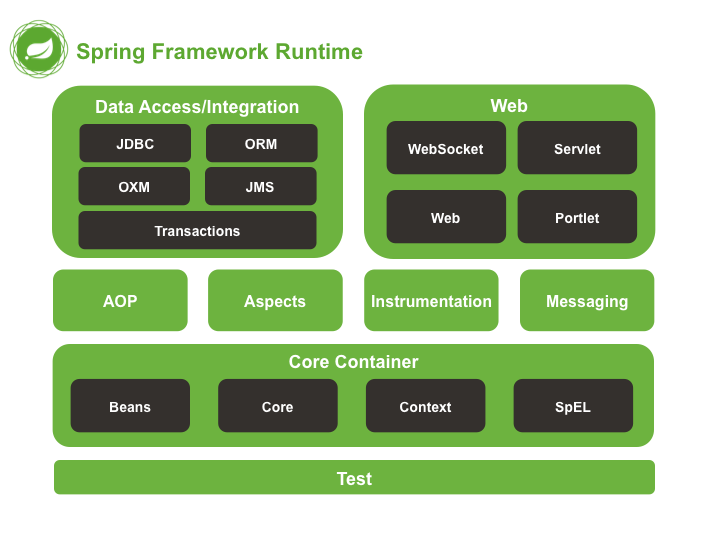
Core Container:
- Core: Provides IoC and Dependency Injection - the foundation of Spring
- Beans: Implements factory pattern for managing application objects
- Context: Adds i18n, events, resource loading features to Core and Beans
- SpEL: Expression language for querying/manipulating objects at runtime
Data Access/Integration:
- JDBC: Simplifies database access with abstraction layer and JdbcTemplate
- ORM: Integrates with Hibernate, JPA, etc. for object-relational mapping
- Transaction: Provides consistent API for transaction management
- JMS: Simplifies Java Message Service integration
- OXM: Abstracts Object/XML mapping implementations
Web:
- Web MVC: Implements Model-View-Controller pattern for web applications
- Web Socket: Enables two-way client-server communication
- Web Servlet: Provides web integration features and Servlet listeners
- Web Portlet: MVC implementation for Portlet environments
AOP and Others:
- AOP: Enables aspect-oriented programming for cross-cutting concerns
- Aspects: Integrates with AspectJ
- Test: Supports testing Spring components with mock objects and utilities
- Messaging: Supports annotation-based message handling
2.3 : Setting Up Spring with IDE
Integrating Spring with an IDE (like Eclipse or IntelliJ IDEA) simplifies development by providing tools for configuration, code generation, and debugging.
Spring Setup in Eclipse/STS:
-
Install Spring Tool Suite (STS):
- Download STS from spring.io
- Or install the STS plugin from Eclipse Marketplace
-
Create a Spring Project:
- File → New → Spring Project
- Select appropriate Spring project template
- Configure project settings and dependencies
-
Maven Configuration:
<dependency> <groupId>org.springframework</groupId> <artifactId>spring-context</artifactId> <version>5.3.23</version> </dependency> -
Basic Project Structure:
src/ ├── main/ │ ├── java/ (Java source code) │ └── resources/ (Configuration files) └── test/ └── java/ (Test source code) pom.xml (Maven configuration) -
Sample Spring Configuration (XML):
<?xml version="1.0" encoding="UTF-8"?> <beans xmlns="http://www.springframework.org/schema/beans" xmlns:xsi="http://www.w3.org/2001/XMLSchema-instance" xsi:schemaLocation="http://www.springframework.org/schema/beans http://www.springframework.org/schema/beans/spring-beans.xsd"> <bean id="helloWorld" class="com.example.HelloWorld"> <property name="message" value="Hello, Spring!" /> </bean> </beans> -
Sample Spring Configuration (Java-based):
@Configuration
public class AppConfig {
    @Bean
    public HelloWorld helloWorld() {
        HelloWorld helloWorld = new HelloWorld();
        helloWorld.setMessage("Hello, Spring!");
        return helloWorld;
    }
}
2.4 : Dependency Injection Methods
PYQ: Explain dependency injection methods in Spring" (2021, 2022, 2024, 7.5-15 marks)
PYQ: Differentiate between Constructor and Setter Injection (2023, 2.5 marks)
Dependency Injection (DI) is a design pattern that implements Inversion of Control (IoC) for resolving dependencies. In traditional programming, the dependent object is responsible for creating or finding its dependencies. With DI, this responsibility is transferred to the container (in this case, the Spring container).
Theoretical Foundation of Dependency Injection:
DI is based on the Dependency Inversion Principle, one of the five SOLID principles of object-oriented design. This principle states:
- High-level modules should not depend on low-level modules. Both should depend on abstractions.
- Abstractions should not depend on details. Details should depend on abstractions.
DI enables:
- Loose coupling between components
- Higher cohesion within individual components
- Greater testability through easier mocking of dependencies
- Greater reusability of components
- Better maintainability by centralizing dependency configuration
Spring IoC Container:
In Spring, the IoC container is responsible for:
- Creating objects
- Configuring objects
- Assembling dependencies between objects
- Managing the complete lifecycle of objects
The container uses configuration metadata, which can be supplied through XML files, Java annotations, or Java code.
Dependency Injection Methods:
PYQ: Explain dependency injection methods in Spring. (2021, 2022, 2024, 7.5-15 marks) PYQ: Differentiate between Constructor and Setter Injection (2023, 2.5 marks)
-
Constructor Injection:
- Dependencies are provided through class constructors.
- Best for mandatory dependencies.
- Ensures immutability if references are not changed.
- Prevents NullPointerException as objects are fully initialized during construction.
public class MovieRecommender { private final MovieCatalog movieCatalog; public MovieRecommender(MovieCatalog movieCatalog) { this.movieCatalog = movieCatalog; } } -
Setter Injection:
- Dependencies are provided through setter methods.
- Best for optional dependencies.
- Allows for reconfiguration or re-injection of dependencies.
- Works well with legacy code that doesn't have constructor parameters.
public class MovieRecommender { private MovieCatalog movieCatalog; public void setMovieCatalog(MovieCatalog movieCatalog) { this.movieCatalog = movieCatalog; } } -
Field Injection:
- Dependencies are injected directly into fields.
- Simplest to write but less explicit than other types.
- Criticized for making testing harder as dependencies cannot be easily injected manually.
- Obscures the dependency requirements of the class.
public class MovieRecommender {
    @Autowired
    private MovieCatalog movieCatalog;
}
Important Annotations for DI:
- @Autowired: Automatically wires beans by type. If multiple beans of the same type exist, a qualifier is needed.
- @Qualifier: Resolves ambiguity when multiple beans of the same type exist by specifying the exact bean to inject.
- @Resource: Injects by name rather than type. It's a Java standard annotation (from javax.annotation package).
- @Inject: A Java standard alternative to @Autowired (from javax.inject package).
- @Value: Injects property values from property files, environment variables, or default values.
- @Primary: Designates a bean as the primary candidate when multiple beans of the same type exist.
- @Lazy: Indicates that a bean should be lazily initialized, only created when needed rather than at startup.
2.5 : Spring AOP (Aspect-Oriented Programming)
PYQ: Spring AOP (2021, 2.5 marks)
What is AOP?
- Aspect-Oriented Programming (AOP) is a programming paradigm that allows separation of cross-cutting concerns from business logic. Here, cross-cutting concerns are aspects of a program that affect multiple modules, such as logging, security, and transaction management.
- AOP enables the modularization of these concerns, making the code cleaner and easier to maintain.
Key Concepts in AOP:
- Aspect: A module that encapsulates a cross-cutting concern (e.g., logging).
- Join Point: A point during the execution of a program where an aspect can be applied (e.g., method execution).
- Advice: The action taken by an aspect at a join point (e.g., logging before or after a method execution).
- Pointcut: An expression that defines a set of join points where advice should be applied.
- Weaving: The process of integrating aspects into the main application code.
2.6 : Spring JDBC Template
Spring JDBC provides an abstraction layer over JDBC, eliminating boilerplate code and handling common exceptions. JDBC (Java Database Connectivity) is a Java API for connecting to relational databases, but it has several drawbacks including verbose code, checked exceptions, and resource management issues.
Challenges with Traditional JDBC:
-
Error-Prone Connection Management: Developers must manually open and close database connections, which can lead to connection leaks.
-
Exception Handling Complexity: JDBC throws checked exceptions that must be caught or declared, leading to cluttered code.
-
Boilerplate Code: Simple operations require substantial boilerplate code (connection setup, statement creation, execution, and resource cleanup).
-
No Abstraction for Different Databases: JDBC code often contains database-specific details.
-
Manual Mapping of Results: Developers must manually map result sets to Java objects.
Spring JDBC's Solutions:
-
Resource Management: Spring automatically handles opening and closing of connections, statements, and result sets.
-
Exception Translation: Translates JDBC's checked exceptions to Spring's unchecked DataAccessExceptions, providing a consistent exception hierarchy.
-
Template Pattern: JdbcTemplate encapsulates the boilerplate code, allowing developers to focus on SQL and result processing.
-
Integration with Spring's Transaction Management: Works seamlessly with Spring's transaction infrastructure.
Core Components of Spring JDBC:
-
JdbcTemplate: The central class that simplifies JDBC operations.
-
NamedParameterJdbcTemplate: Extension of JdbcTemplate that supports named parameters instead of "?" placeholders.
-
SimpleJdbcInsert & SimpleJdbcCall: Simplified approaches for database inserts and stored procedure calls.
-
ResultSetExtractor & RowMapper: Interfaces for mapping result sets to Java objects.
-
SQLExceptionTranslator: Converts database-specific SQLExceptions to Spring's DataAccessExceptions.
Benefits of JdbcTemplate:
- Simplified JDBC Operations: Reduces boilerplate code by 50-70%.
- Automatic Resource Management: Handles connection, statement, and result set lifecycle.
- Exception Handling and Translation: Converts checked SQLException to unchecked DataAccessException.
- Query Execution Methods: Provides various methods for different types of queries.
- Batch Operations: Simplified execution of batch updates.
- Type-Safe Queries: Support for strongly typed parameter and result handling.
JdbcTemplate Common Operations:
- Query for single value:
queryForObject(sql, requiredType) - Query for object:
queryForObject(sql, parameterValues, rowMapper) - Query for list:
query(sql, rowMapper) - Update operations:
update(sql, parameterValues) - Batch updates:
batchUpdate(sql, batchArgs) - Execute DDL/stored procedures:
execute(sql)
Basic JdbcTemplate Example:
@Repository
public class UserDao {
    private JdbcTemplate jdbcTemplate;

    @Autowired
    public UserDao(DataSource dataSource) {
        this.jdbcTemplate = new JdbcTemplate(dataSource);
    }

    public User getUserById(long id) {
        String sql = "SELECT * FROM users WHERE id = ?";
        return jdbcTemplate.queryForObject(sql, new Object[] { id },
            (rs, rowNum) -> new User(
                rs.getLong("id"),
                rs.getString("name"),
                rs.getString("email")
            ));
    }
}
Named Parameter JDBC Template:
Named parameters improve code readability compared to positional parameters (?):
public User getUserById(long id) {
    String sql = "SELECT * FROM users WHERE id = :id";
    MapSqlParameterSource params = new MapSqlParameterSource();
    params.addValue("id", id);
    return namedParameterJdbcTemplate.queryForObject(sql, params, userRowMapper);
}
2.7 : Spring ORM
Object-Relational Mapping (ORM) is a technique that maps object-oriented domain models to relational databases. Spring ORM provides integration layers for popular ORM frameworks, adding benefits like transaction management and exception handling.
The Object-Relational Impedance Mismatch:
The fundamental challenge ORM addresses is the "impedance mismatch" between object-oriented programming and relational databases:
-
Inheritance vs. Tables: OOP supports inheritance hierarchies, while relational databases have flat table structures.
-
Associations vs. Foreign Keys: Objects reference each other directly, while databases use foreign keys.
-
Identity vs. Primary Keys: Objects have identity based on memory location, while database records use primary keys.
-
Navigation vs. Joins: Objects are navigated through references, while databases use joins.
-
Data Types: Programming languages and databases have different data type systems.
Benefits of Using ORM:
- Productivity: Reduces boilerplate database access code.
- Maintainability: Changes to data model require fewer changes to code.
- Performance: ORM frameworks include optimizations like caching.
- Vendor Independence: Can switch database vendors with minimal code changes.
- Object-Oriented Query Capabilities: Query in object-oriented terms rather than SQL.
Spring ORM Integration:
Spring provides integration with several ORM frameworks:
- Hibernate: The most popular ORM framework for Java.
- JPA (Java Persistence API): Standard Java specification for ORM.
- JDO (Java Data Objects): Another standard for object persistence.
- MyBatis (formerly iBATIS): SQL mapping framework that bridges objects and stored procedures or SQL statements.
Spring's Value Addition to ORM:
- Resource Management: Spring manages ORM resources (Sessions, EntityManagers).
- Integrated Transaction Management: Provides a consistent transaction model across different ORM frameworks.
- Exception Translation: Converts ORM-specific exceptions to Spring's DataAccessExceptions.
- Integration Testing Support: Provides utilities for testing repositories.
- DAO Support Classes: Template classes to simplify DAO implementations.
Spring with Hibernate Integration Approaches:
-
Spring's HibernateTemplate (Legacy):
- Provides simplified API for Hibernate operations
- Handles session management and exception translation
- Now considered legacy as modern Hibernate has improved API
-
SessionFactory with Dependency Injection:
- Inject SessionFactory into DAOs
- Use Spring's transaction management
- More direct control over Hibernate APIs
-
LocalSessionFactoryBean:
- Spring's FactoryBean that creates Hibernate SessionFactory
- Integrates with Spring's transaction management
- Supports annotation scanning for entity classes
Transaction Management with Spring ORM:
Spring's transaction management provides a consistent programming model across different transaction APIs:
- Declarative Transaction Management: Using annotations or XML
- Programmatic Transaction Management: Using TransactionTemplate or TransactionManager
2.8 : Spring Expression Language (SpEL)
Spring Expression Language (SpEL) is a powerful expression language supporting querying and manipulating an object graph at runtime. It was introduced in Spring 3.0 and serves as the foundation for expression evaluation throughout the Spring portfolio.
Purpose and Design Goals of SpEL:
- Unified Expression Evaluation: Provides a single expression language across various Spring projects.
- Dynamic Property Resolution: Enables accessing properties and methods at runtime.
- Complex Object Navigation: Supports navigating through complex object hierarchies.
- Configuration Flexibility: Allows dynamic configuration based on runtime conditions.
- Environment Integration: Integrates with Spring's property resolution mechanism.
Core Architecture of SpEL:
SpEL's architecture consists of several components:
- ExpressionParser: Parses string expressions into Expression objects
- Expression: Represents a parsed expression that can be evaluated
- EvaluationContext: Provides context for expression evaluation
- TypeConverter: Converts between types during expression evaluation
Common SpEL Use Cases:
- Configuration: Used in @Value annotations and XML bean definitions
- Data Binding: Used in Spring Web Flow and form binding
- Security Expressions: Powering Spring Security's authorization expressions
- View Templates: Used in templating technologies like Thymeleaf
Language Features of SpEL:
-
Literal Expressions: Strings, numeric values, boolean values, null
'Hello World' // String literal 42 // Integer literal 3.14 // Floating-point literal true // Boolean literal null // Null literal -
Property Access: Accessing properties using dot notation
person.name employee.department.name -
Method Invocation: Invoking methods on objects
'hello'.toUpperCase() person.getName() -
Array and Collection Access: Accessing elements by index or key
numbers[0] // Array access employees[5].name // Array element property access dictionary['key'] // Map access -
Operators: Mathematical, relational, logical, and conditional operators
2 + 2 // Addition 10 > 5 // Comparison true and false // Logical AND !active // Logical NOT name == 'John' ? 'Hi John' : 'Hello' // Ternary operator -
Type Operations: Type checking and conversion
person instanceof Person 'ABC' matches '[A-Z]+' T(java.lang.Math).random() // Type reference for static method access -
Collection Projection and Selection: Operating on collections
employees.![name] // Collection projection (extract all names) employees.?[salary > 50000] // Collection selection (filter by condition) -
Elvis Operator: Null-safe navigation
person?.name // Returns null if person is null
2.9 : Spring MVC and Tag Library
PYQ: Elaborate Spring MVC Tiles with the help of program. (2023, 15 marks) PYQ: What is MVC tag library in spring? (2024, 7.5 marks)
Spring MVC is a robust web framework built on the Model-View-Controller architectural pattern. It separates the application into three interconnected components, promoting a clear division of responsibilities.
Architectural Foundation of Spring MVC:
The MVC (Model-View-Controller) pattern separates an application into three main components:
- Model: Encapsulates the application data and business logic
- View: Renders the model data, generating HTML output
- Controller: Processes incoming requests, manipulates the model, and selects a view
This separation provides several benefits:
- Decoupled Components: Changes to one component have minimal impact on others
- Testability: Components can be tested in isolation
- Specialized Development: Teams can work on different components simultaneously
- Reusability: Models and controllers can be reused across different views
Spring MVC Request Processing Flow:
- Client Request: The client sends an HTTP request to the web server
- Front Controller: DispatcherServlet receives all requests and acts as a central controller
- Handler Mapping: Determines which controller should handle the request
- Controller Execution: The selected controller processes the request
- Model Creation: Controller creates/updates the model with data
- View Selection: Controller returns a logical view name
- View Resolution: ViewResolver maps logical view name to actual view implementation
- View Rendering: View uses model data to render the response
- Response Return: The rendered response is sent back to the client
Key Components of Spring MVC:
-
DispatcherServlet: Front controller that handles all HTTP requests and responses. It delegates the actual processing to specialized components.
-
HandlerMapping: Identifies the appropriate controller for each request based on URL patterns, HTTP methods, headers, parameters, etc.
-
Controller: Processes requests, interacts with services and repositories, and returns a ModelAndView or view name. Modern controllers use annotations like @Controller and method-level mappings.
-
ModelAndView: Holds model data and view information. Model is essentially a Map that contains data to be rendered by the view.
-
ViewResolver: Resolves logical view names to actual view implementations. Spring MVC supports various view technologies including JSP, Thymeleaf, FreeMarker, etc.
-
View: Renders the model data as a response. Views are typically templates that combine static content with dynamic data from the model.
-
HandlerInterceptor: Intercepts requests before and after they are handled by controllers, enabling cross-cutting concerns like security, logging, etc.
Controller Types in Spring MVC:
- @Controller: Standard annotation for request handling controllers
- @RestController: Specialized controller for RESTful web services (@Controller + @ResponseBody)
- MultiActionController: Legacy controller handling multiple actions (pre-annotation era)
Data Binding and Validation:
Spring MVC provides robust mechanisms for:
- Binding request parameters to model objects
- Data type conversion
- Validation using Bean Validation (JSR-303)
- Error handling and error messages display
Spring MVC Annotations:
- @Controller: Marks a class as a Spring MVC controller
- @RequestMapping: Maps web requests to handler methods (can specify URL, HTTP method, etc.)
- @GetMapping/@PostMapping/etc.: Specialized RequestMapping for specific HTTP methods
- @RequestParam: Binds request parameters to method parameters
- @PathVariable: Binds URI template variables to method parameters
- @ModelAttribute: Binds form data to a Java object
- @Valid: Triggers validation of an object
Spring MVC Form Tags:
Spring provides a comprehensive tag library for form binding and rendering:
- form:form: Creates an HTML form with binding to a model attribute
- form:input/password/textarea: Input fields bound to model properties
- form:checkbox/radiobutton: Checkbox and radio button inputs
- form:select/option/options: Dropdown selection lists
- form:errors: Displays field-specific validation errors
Example:
<form:form method="post" modelAttribute="user">
    <div>
        <form:label path="name">Name</form:label>
        <form:input path="name" />
        <form:errors path="name" cssClass="error" />
    </div>

    <div>
        <form:label path="email">Email</form:label>
        <form:input path="email" />
        <form:errors path="email" cssClass="error" />
    </div>
      <button type="submit">Submit</button>
</form:form>
Spring MVC Tiles Integration
Apache Tiles is a templating framework that enables the reuse of page fragments (header, footer, menu) in Spring MVC applications. It helps maintain a consistent layout across pages.
Benefits of Tiles:
- Consistent layout across all pages
- Reuse of common fragments (header, footer, navigation)
- Easier maintenance
- Separation of layout from content
- Reduced duplication of HTML/JSP code
2.10 : Spring RESTful Web Services
REST (Representational State Transfer) is an architectural style for designing networked applications. Spring provides excellent support for building RESTful web services through its Spring MVC framework and specialized annotations.
REST Architectural Constraints:
REST was defined by Roy Fielding in his doctoral dissertation and includes six constraints:
- Client-Server Architecture: Separation of concerns between client and server
- Statelessness: Each request contains all information needed to understand and complete it
- Cacheability: Responses must define themselves as cacheable or non-cacheable
- Layered System: Client cannot tell whether it's connected directly to the end server
- Uniform Interface: Simplified, decoupled architecture where implementations can evolve independently
- Code On Demand (optional): Servers can temporarily extend client functionality
RESTful Resource Modeling:
In REST, everything is a resource, which can be:
- An entity (customer, order, product)
- A collection of entities
- A non-entity resource (calculation result, status)
Resources are identified by URIs, manipulated through representations, and include self-descriptive messages with hypermedia links (HATEOAS).
Richardson Maturity Model:
A model for evaluating REST API implementations:
- Level 0: Single URI, one HTTP method (typically POST)
- Level 1: Multiple URIs for different resources, still one HTTP method
- Level 2: HTTP verbs used properly (GET, POST, PUT, DELETE)
- Level 3: HATEOAS (Hypermedia as the Engine of Application State)
HTTP Methods in RESTful APIs:
- GET: Retrieve a resource (safe, idempotent)
- POST: Create a new resource (neither safe nor idempotent)
- PUT: Update a resource (idempotent)
- DELETE: Remove a resource (idempotent)
- PATCH: Partial update (not idempotent)
- OPTIONS: Query supported operations on a resource
- HEAD: Like GET but without response body
Spring's REST Support:
-
@RestController: Specialized controller where every method returns a domain object instead of a view. Combines @Controller and @ResponseBody.
-
RequestMapping Methods: @GetMapping, @PostMapping, @PutMapping, @DeleteMapping, @PatchMapping for HTTP method-specific mappings.
-
Content Negotiation: Automatically converts between different formats (JSON, XML, etc.) based on Accept and Content-Type headers.
-
ResponseEntity: Provides control over HTTP response, including status code, headers, and body.
-
@PathVariable: Extracts values from the URI path.
-
@RequestBody: Binds request body to a domain object.
-
@ResponseStatus: Customizes HTTP response status code.
-
Exception Handling: Global and controller-specific exception handling with @ExceptionHandler.
2.12 : Spring Security
Spring Security is a powerful and customizable authentication and access control framework for Java applications. It provides comprehensive security services for Java EE-based enterprise software applications.
Key Features of Spring Security:
- Authentication: Verifies the identity of users
- Authorization: Determines if authenticated users have permission to access resources
- Protection against common vulnerabilities: CSRF, XSS, session fixation, etc.
- Declarative security: Annotations and XML configuration for securing methods and URLs
- Integration with various authentication mechanisms: LDAP, OAuth2, JWT, etc.
- Customizable: Extensible architecture for custom security requirements
Security Fundamentals:
Security typically involves two main aspects:
- Authentication: Verifying the identity of a principal (user)
- Authorization: Determining if an authenticated principal is allowed to perform a requested action
Other important security concepts include:
- Principal: The currently authenticated user
- Credentials: Information that verifies the identity (password, certificate, etc.)
- Authorities/Roles: Permissions granted to a principal
Spring Security Architecture:
Spring Security has a layered architecture:
- Security Filters Chain: Series of servlet filters that process security concerns
- Authentication Manager: Verifies user credentials and creates authentication tokens
- Access Decision Manager: Makes authorization decisions based on access control rules
- Security Contexts: Stores authentication information for the current thread/request
Authentication Process:
- User submits credentials
- Authentication Filter extracts credentials from the request
- Authentication Manager delegates to appropriate Authentication Provider
- Authentication Provider validates credentials against user store
- If valid, creates authenticated Authentication object with granted authorities
- Authentication stored in Security Context
- Success or Failure handler processes the result
Authentication Methods:
Spring Security supports various authentication methods:
- Form-based: Traditional username/password login form
- HTTP Basic: Credentials sent in Authorization header
- HTTP Digest: Similar to Basic but more secure
- X.509 Certificates: Client certificate authentication
- OAuth 2.0 / OpenID Connect: For single sign-on and API authorization
- LDAP: Enterprise directory service authentication
- Remember-Me: Persistent login across sessions
- Custom Authentication: Custom implementations for special needs
Authorization Mechanisms:
Spring Security provides several approaches to authorization:
- URL-based Security: Securing URL patterns with required authorities
- Method Security: Securing methods with annotations
- Domain Object Security (ACLs): Securing individual domain objects
2.13 : Spring with Angular
Spring and Angular are often used together to create full-stack applications. Spring serves as the backend REST API, while Angular is the frontend framework that consumes these APIs. Angular is a popular framework for building single-page applications (SPAs) using JavaScript/TypeScript. It provides a rich set of features for building dynamic and responsive user interfaces.
Features of Angular:
- Component-Based Architecture: Angular applications are built using reusable components.
- Two-Way Data Binding: Synchronizes data between the model and the view, allowing for real-time updates.
- Dependency Injection: Angular's built-in dependency injection system makes it easy to manage services and components.
- Routing: Angular provides a powerful routing module for navigating between views and components.
- Forms: Angular provides robust support for building and validating forms, including reactive forms and template-driven forms.
- HTTP Client: Angular's HttpClient module simplifies making HTTP requests to RESTful APIs.
- Testing: Angular has built-in support for unit testing and end-to-end testing using tools like Jasmine and Protractor.
- Animations: Angular provides a powerful animation library for creating dynamic and engaging user interfaces.
Key Integration Points:
- Backend REST API: Spring Boot provides the RESTful services
- Frontend Consumption: Angular consumes these services
- CORS Configuration: Spring handles cross-origin requests
- Authentication: JWT or OAuth2 for secure communication
- Build Process: Tools to build both in a single workflow
Spring Boot CORS Configuration:
@Configuration
public class WebConfig implements WebMvcConfigurer {
    @Override
    public void addCorsMappings(CorsRegistry registry) {
        registry.addMapping("/api/**")
                .allowedOrigins("http://localhost:4200")
                .allowedMethods("GET", "POST", "PUT", "DELETE");
    }
}
The above configuration allows Angular (running on port 4200) to access Spring Boot APIs.
These notes were compiled by Deepak Modi, MDU (2026) Contact: deepakmodidev@gmail.com