Syllabus:
GSM: Mobile Services, Architecture Radio, Interface, Protocol, Localization, Calling Handover, Security, New data services.
Wireless LAN: IEEE 802.11 - System and Protocol Architecture, Physical Layer, MAC Layered Management.
Bluetooth: User scenarios, Physical layer, MAC Layer, Networking, Security and Link Management.
Wimax
Content Outline
- 1. GSM (Global System for Mobile Communications)
- 1.1 Mobile Services in GSM
- 1.2 GSM Architecture
- 1.3 Radio Interface
- 1.4 GSM Protocol Architecture
- 1.5 Localization and Calling
- 1.6 Handover in GSM
- 1.7 Security in GSM
- 1.8 GSM Data Services
- 2. Wireless LAN (IEEE 802.11)
- 2.1 System and Protocol Architecture
- 2.2 IEEE 802.11 Physical Layer
- 2.3 MAC Layer and Management
- 2.4 Security in Wireless LAN
- 3. Bluetooth
- 3.1 User Scenarios and Applications
- 3.2 Physical Layer
- 3.3 MAC Layer
- 3.4 Networking
- 3.5 Security and Link Management
- 4. WiMAX (Worldwide Interoperability for Microwave Access)
- 4.1 Introduction to WiMAX
- 4.2 WiMAX Physical Layer
- 4.3 WiMAX MAC Layer
- 4.4 QoS in WiMAX
- 4.5 Mobility Management in WiMAX
- 4.6 WiMAX Network Architecture
- 4.7 WiMAX Applications and Market Position
Section 1. GSM (Global System for Mobile Communications)
PYQ: Explain GSM. (2021, 7.5 marks)
GSM (Global System for Mobile Communications) is one of the most widely used mobile communication standards globally. It is primarily designed for mobile voice services but has evolved to support a wide range of data and multimedia services. GSM operates in the 2G and 3G spectrum bands and has become the foundation for modern mobile networks, including 4G and 5G networks.
1.1 Mobile Services in GSM
GSM provides several mobile services, which can be broadly classified into basic services and supplementary services. These services support voice, data, and messaging communication, and they allow users to have a comprehensive mobile experience.
Basic Mobile Services in GSM:
-
Voice Call Services:
- The primary service of GSM is to provide voice communication, enabling users to make and receive calls. The GSM network supports circuit-switched voice calls, meaning a dedicated communication channel is established for the duration of the call.
-
Short Message Service (SMS):
- SMS allows users to send and receive text messages. It is a store-and-forward service, meaning the messages are stored on an SMS center and forwarded to the recipient's device when available. SMS is one of the most popular and widely used services in GSM.
-
Mobile Data Services (GPRS/EDGE):
- GSM also supports mobile data services through GPRS (General Packet Radio Service) and EDGE (Enhanced Data rates for GSM Evolution). These technologies enable users to access the internet, send emails, and browse websites. GPRS offers low-speed data transfer, while EDGE provides enhanced data transfer speeds for better browsing experience.
Supplementary Mobile Services in GSM:
-
Call Forwarding: This service allows calls to be redirected to another number. For example, if the user is unavailable, incoming calls can be forwarded to voicemail or another phone number.
-
Call Barring: Users can block certain types of calls, such as incoming or outgoing international calls, or calls to specific numbers. This is a useful feature for controlling expenses or avoiding unwanted calls.
-
Call Waiting: If the user is on a call and another call comes in, call waiting alerts the user and gives them the option to switch between calls.
-
Caller Line Identification (CLI): This service allows users to view the phone number or identity of the person calling, which helps with identifying incoming calls.
-
Voicemail: When a user is unavailable, incoming calls are automatically directed to voicemail, where the caller can leave a voice message. The user can later listen to the voicemail messages.
-
Conference Calling: This service allows users to participate in a call with multiple participants at once, making it easier for group discussions.
1.2 GSM Architecture
PYQ: Explain GSM architecture and its elements with suitable diagram. (2024, 15 marks)
PYQ: Explain in detail about GSM architecture with suitable diagram. (2023, 8 marks)
The GSM architecture defines the different network elements required to deliver mobile communication services. It consists of multiple subsystems and components that work together to enable seamless communication.
Key Components of GSM Architecture:
The GSM architecture is divided into three main subsystems:
-
Mobile Station (MS):
The Mobile Station (MS) is the user's device, commonly known as a mobile phone that is used by the subscriber to make calls, send text messages, and access other mobile services. It consists of two parts:- Mobile Equipment (ME): The hardware of the phone (like the handset).
- Subscriber Identity Module (SIM): A smart card inserted into the phone that stores information like the user’s identity, phone number, and network preferences.
-
Base Station Subsystem (BSS):
The BSS manages the radio communication between the mobile station and the network. It consists of:- Base Transceiver Station (BTS): The hardware responsible for radio communication with the mobile station. Each BTS covers a certain geographical area known as a cell.
- Base Station Controller (BSC): The BSC manages multiple BTSs and handles tasks like call setup, handover, and frequency allocation. It acts as a bridge between the BTS and the Mobile Switching Center (MSC).
-
Network Subsystem (NSS):
The NSS is responsible for the overall management of the mobile network. It consists of several components:- Mobile Switching Center (MSC): The central switching unit that connects calls between mobile stations and other networks (like the Public Switched Telephone Network, PSTN). It also manages mobility, call routing, and handover.
- Home Location Register (HLR): A database that stores subscriber information, including user profiles, service subscriptions, and current location. It is used for call routing and authentication.
- Visitor Location Register (VLR): A temporary database that stores information about subscribers currently in the MSC's area. It helps reduce the load on the HLR by storing frequently accessed data.
- Authentication Center (AUC): A security component that verifies the identity of the mobile station and ensures secure communication. It generates authentication keys and checks user credentials.
- Equipment Identity Register (EIR): A database that stores information about mobile equipment, including device identity and status. It helps prevent the use of stolen or unauthorized devices on the network.
These components work together to provide seamless mobile communication services to users. When a call is made, the BTS receives the call and forwards it to the BSC, which then routes it to the MSC. The MSC checks the HLR for subscriber information and forwards the call to the appropriate destination, whether it is another mobile station or a landline. In addition, the AUC verifies the user's identity and ensures secure communication. The EIR checks the device's identity to prevent unauthorized access to the network.
GSM Architecture Diagram:

1.3 Radio Interface
The radio interface in GSM is the connection between the mobile station (MS) and the base station subsystem (BSS). It uses radio frequencies (RF) to transmit and receive signals, allowing wireless communication over the air.
Key Aspects of GSM Radio Interface:
-
Frequency Bands:
- GSM operates in various frequency bands, depending on the region. The primary bands are:
- 900 MHz (used in Europe, Asia, and Africa.)
- 1800 MHz (used in Europe and Asia as an extension of the 900 MHz band)
- 850 MHz and 1900 MHz (used in North America and some parts of South America.)
- GSM operates in various frequency bands, depending on the region. The primary bands are:
-
Radio Channels:
- GSM uses a combination of time and frequency division to create multiple radio channels, allowing several users to share the same frequency spectrum.
- Frequency Division Duplex (FDD): The system uses separate frequencies for uplink (mobile to base station) and downlink (base station to mobile).
- Time Division Multiple Access (TDMA): Each frequency channel is divided into multiple time slots, allowing multiple calls to share the same frequency.
- GSM uses a combination of time and frequency division to create multiple radio channels, allowing several users to share the same frequency spectrum.
-
Cell Structure:
- The mobile network is divided into small geographic areas called cells, which are served by a BTS. Each cell has its own frequency channels, and neighboring cells have different frequencies to avoid interference.
-
Signal Propagation:
- Signals in GSM use radio waves to propagate through space, and these waves travel through the air. Propagation is influenced by environmental factors such as weather, terrain, and obstacles (e.g., buildings or mountains), which can cause fading, interference, and signal attenuation.
1.4 GSM Protocol Architecture
GSM uses a layered protocol architecture (similar to OSI) to manage communication between the mobile station (MS) and the network. It is designed to support call setup, handover, SMS, data services, and security.
Key Protocol Layers in GSM:
-
Layer 1: Physical Layer:
- This layer deals with the transmission of raw data over the radio interface, including frequency, time slots, and power control. It defines how the signal is modulated and transmitted.
-
Layer 2: Data Link Layer:
- The Data Link Layer is responsible for reliable communication over the physical layer. It includes the Radio Link Control (RLC) and Medium Access Control (MAC) protocols. It manages data transfer between the mobile station and the base station.
-
Layer 3: Network Layer:
- The Network Layer is responsible for managing call setup, handover, and data services. It includes several key protocols, such as:
- Radio Resource Control (RRC): Manages radio resources, like establishing and releasing radio connections.
- Mobility Management (MM): Handles location updates and mobility management.
- Connection Management (CM): Responsible for setting up and maintaining the connection between the MS and the network.
- The Network Layer is responsible for managing call setup, handover, and data services. It includes several key protocols, such as:
-
Application Layer:
- The Application Layer provides services to the user, such as SMS, voice calls, and data services. It includes protocols like Short Message Service Protocol (SMSP) for SMS and Call Control Protocol (CCP) for voice calls.
1.5 Localization and Calling
Localization in GSM refers to the process of determining the location of a mobile station (MS) within the network. This is essential for call routing, billing, and providing location-based services. GSM uses a combination of location areas and cell identifiers to track the position of mobile stations.
Key Components of Localization in GSM:
-
Location Area (LA):
- The network divides the service area into Location Areas, each consisting of a set of cells. Each LA has a Location Area Identifier (LAI), which helps identify the area where the mobile station is located.
-
Location Update:
- When a mobile station moves from one location area to another, it performs a location update by notifying the network of its new location.
-
Calling in GSM:
- To initiate a call, the MS sends a call setup request to the network, which checks the subscriber's details from the HLR or VLR database. Once verified, the call is routed through the network, and the recipient is alerted.
1.6 Handover in GSM
Handover in GSM refers to the process of transferring an ongoing call from one base station (BTS) to another when the mobile station moves across different cells or location areas. This is crucial for maintaining call continuity and quality of service in mobile communication.
Types of Handover:
- Hard Handover:
- In a hard handover, the connection to the current BTS is broken before establishing a new connection with the next BTS. This can lead to a brief interruption in the call.
- Soft Handover:
- In a soft handover, the mobile station maintains connections with multiple BTSs simultaneously during the transition. This allows for a smoother handover without call interruption.
- Intra-cell and Inter-cell Handover:
- Intra-cell handover occurs within the same cell, while inter-cell handover happens when the MS moves between different cells.
1.7 Security in GSM
PYQ: What do you mean by security in GSM? Explain in detail. (2022, 7 marks)
Security is a critical aspect of GSM, as it ensures the confidentiality, integrity, and authenticity of communication between mobile stations and the network. Several security features are implemented to protect the users and network.
Security Features in GSM:
-
Encryption:
- GSM uses encryption techniques to protect the communication between the mobile station and the network. The user data and signaling information are encrypted to prevent unauthorized interception.
-
Authentication:
- Before a mobile station is allowed to connect to the network, it must undergo an authentication process to verify the subscriber's identity. This prevents fraud and unauthorized access.
-
Temporary Identity:
- GSM uses a temporary Temporary Mobile Subscriber Identity (TMSI) to protect the subscriber's permanent identity. This prevents tracking and ensures privacy.
-
Subscriber Identity Module (SIM):
- The SIM card contains security keys and algorithms used for authentication and encryption. It securely stores the subscriber's information and is essential for accessing the network.
1.8 GSM Data Services
In addition to voice services, GSM also supports data services like SMS, GPRS, EDGE, HSPA, LTE, and NR (5G). These services enable users to access the internet, send emails, and use various applications on their mobile devices.
GSM Data Services:
-
SMS (Short Message Service):
- SMS allows users to send short text messages (up to 160 characters). It is one of the most popular services on GSM. It is often referred to as 2G service, as it was introduced with the GSM standard.
-
GPRS (General Packet Radio Service):
- GPRS enables packet-switched data transmission, allowing users to access the internet and send emails. It provides speeds up to 40 kbps. It is often referred to as 2.5G, as it provides a bridge between 2G and 3G networks.
-
EDGE (Enhanced Data Rates for GSM Evolution):
- EDGE is a faster version of GPRS, providing data speeds up to 384 kbps. It allows for better internet browsing, multimedia messaging, and mobile applications. It is often referred to as 2.75G, as it enhances the capabilities of GPRS.
-
HSPA (High-Speed Packet Access):
- An evolution of GSM, providing higher data rates for mobile internet access. It can achieve speeds up to several Mbps, enabling video streaming, online gaming, and other data-intensive applications. It is often used in 3G networks and is backward compatible with GSM.
-
LTE (Long-Term Evolution):
- LTE is a 4G technology that provides even higher data rates and lower latency compared to HSPA. It is designed to support high-speed internet access, video streaming, and other data-intensive applications. LTE networks are often built on top of existing GSM infrastructure.
-
NR (New Radio):
- NR is the 5G technology that provides ultra-high-speed data rates, low latency, and massive connectivity for IoT devices. It is designed to support advanced applications like augmented reality, virtual reality, and smart cities. NR networks are built on top of existing GSM and LTE infrastructure.
Section 2. Wireless LAN (IEEE 802.11)
PYQ: Explain Wireless LAN. (2024, 7.5 marks)
Wireless LAN (WLAN) is a technology that allows devices to connect to the internet or comunicate within a local area network (LAN) using radio waves instead of wired connections. IEEE 802.11 is the standard that defines the operation of WLANs.
WLANs are widely used in homes, offices, and public spaces to provide high-speed internet access and facilitate communication between devices.
2.1 System and Protocol Architecture
PYQ: Draw the protocol architecture of IEEE 802.11. (2023, 8 marks)
PYQ: Describe the protocol architecture of IEEE 802.11 in detail. (2021, 15 marks)
The IEEE 802.11 protocol architecture defines how wireless LAN devices communicate with each other. It's structured into multiple layers that handle different aspects of wireless communication.
System Architecture:
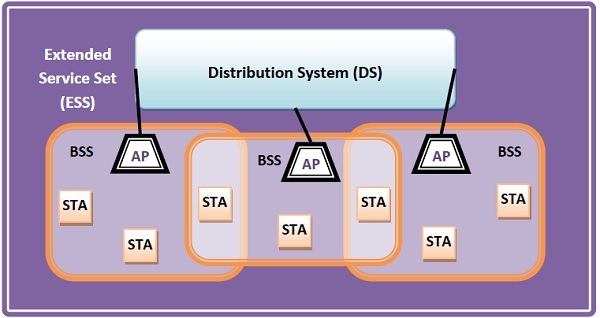
The IEEE 802.11 standard, popularly known as WiFi, lays down the architecture and specifications of wireless LANs (WLANs). The IEEE 802.11 system architecture consists of several key components:
-
Stations (STA):
- All devices connected to the wireless LAN, including:
- Access Points (AP) - Base stations that form the network infrastructure
- Clients - End-user devices like laptops, smartphones, printers, etc.
- All devices connected to the wireless LAN, including:
-
Basic Service Set (BSS):
- A group of stations (STA) that communicate with each other within a specific area.
- Can operate in two modes:
- Infrastructure BSS - Devices communicate through access points
- Independent BSS - Devices communicate in an ad hoc peer-to-peer manner
-
Extended Service Set (ESS):
- A set of connected Basic Service Sets (BSS) that allows seamless roaming between different access points.
- Allows for larger network coverage and mobility of devices.
-
Distribution System (DS):
- Connects access points in an Extended Service Set (ESS).
- Responsible for forwarding frames between different BSSs and managing communication across the network.
Protocol Architecture:
IEEE 802.11 uses a layered protocol architecture similar to the OSI model:
-
Physical Layer (PHY 802.11):
- Handles the transmission of data bits over radio waves
- Responsible for modulation, frequency allocation, and signal processing
-
Medium Access Control (MAC 802.11) Layer:
- Controls access to the shared wireless medium
- Manages data frame transmission between devices
- Handles addressing and frame formatting
-
Logical Link Control (LLC 802.2) Layer:
- Provides standardized interface to upper layer protocols
- Handles error correction and flow control
Frame Format:
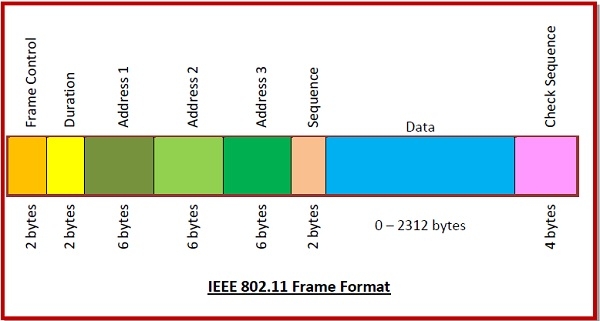
The IEEE 802.11 frame format consists of:
-
Frame Control (2 bytes):
- Contains 11 subfields with control information
-
Duration (2 bytes):
- Specifies how long the frame and its acknowledgment occupy the channel
-
Address Fields (three 6-byte fields):
- Source address
- Immediate destination address
- Final endpoint address
-
Sequence Control (2 bytes):
- Stores frame sequence numbers
-
Data (variable size):
- Carries data from upper layers
- Maximum size of 2312 bytes
-
Check Sequence (4 bytes):
- Contains error detection information
2.2 IEEE 802.11 Physical Layer
PYQ: Draw the physical layer configuration of HiperLAN. (2022, 8 marks)
The Physical Layer (PHY) defines how data is transmitted over the wireless medium (air). It specifies the characteristics of the radio signal, modulation techniques, frequency bands, and channelization used in wireless communication.
Key Components of the 802.11 PHY:
-
Modulation Techniques:
- The PHY layer uses different modulation schemes to convert data into radio waves. Popular schemes include:
- BPSK (Binary Phase Shift Keying)
- QPSK (Quadrature Phase Shift Keying)
- 16-QAM (Quadrature Amplitude Modulation)
- 64-QAM (64-QAM)
- The PHY layer uses different modulation schemes to convert data into radio waves. Popular schemes include:
-
Frequency Bands:
- IEEE 802.11 operates in two primary frequency bands:
- 2.4 GHz band: Used by most devices (802.11b/g/n).
- 5 GHz band: Provides faster speeds and less interference, used by 802.11a/n/ac/ax.
- IEEE 802.11 operates in two primary frequency bands:
-
Channelization:
- The frequency band is divided into smaller channels to allow multiple devices to communicate simultaneously without interference. Channel bandwidths can be 20 MHz, 40 MHz, 80 MHz, or 160 MHz, depending on the standard.
-
Transmission Rates:
- The PHY layer supports different transmission rates depending on the modulation and channel conditions. For example, 802.11b provides speeds up to 11 Mbps, while 802.11ac can offer speeds up to 1 Gbps or more.
-
OFDM (Orthogonal Frequency Division Multiplexing):
- Used in 802.11a/g/n/ac/ax, OFDM allows multiple data streams to be transmitted simultaneously over different frequencies, improving overall throughput and reducing interference.
Frame Structure:
- The PHY layer defines the structure of frames transmitted over the air. Each frame consists of a preamble, header, payload, and trailer. The preamble helps synchronize the receiver, while the header contains control information. The payload carries the actual data, and the trailer includes error detection information.
+---------+--------+---------+----------------+
| Preamble| Header | Payload | Check Sequence |
+---------+--------+---------+----------------+
Physical Layer Functions:
- Signal Generation:
- Converts digital data into analog signals for transmission over the air.
- Signal Reception:
- Receives analog signals from the air and converts them back into digital data.
- Channel Estimation:
- Estimates the channel conditions to optimize transmission parameters like power and modulation.
- Error Detection:
- Uses techniques like CRC (Cyclic Redundancy Check) to detect errors in received frames.
- Power Management:
- Implements power-saving mechanisms to extend battery life in mobile devices, such as sleep modes and dynamic power adjustment based on channel conditions.
2.3 MAC Layer and Management
PYQ: What are the tasks performed by MAC layer in IEEE 802.11 protocol architecture? (2022, 8 marks)
PYQ: Discuss MAC Layered Management. (2023, 7 marks)
The MAC (Medium Access Control) layer controls access to the shared wireless medium and ensures that data is transmitted efficiently and fairly between devices. It is responsible for managing how devices communicate over the wireless network, handling data frames, and ensuring reliable communication.
Key Components of the MAC Layer:
-
Carrier Sense Multiple Access with Collision Avoidance (CSMA/CA):
- A protocol that manages access to the shared wireless medium. It involves "listening" for activity on the channel (Carrier Sense) and waiting for a clear channel before transmitting (Collision Avoidance).
-
Frame Structure:
- Data is transmitted in frames, each with a specific structure that includes a header, payload, and trailer. The MAC frame consists of:
- Frame Control
- Duration
- Addressing
- Sequence Control
- Data Payload
- Data is transmitted in frames, each with a specific structure that includes a header, payload, and trailer. The MAC frame consists of:
-
Acknowledgement (ACK):
- After a device transmits a frame, the receiving device sends an acknowledgement (ACK) to confirm receipt. This helps in reliable communication and ensures that data is not lost.
-
Powersaving Mechanisms:
- To save battery life on mobile devices, the MAC layer includes mechanisms like TWT (Target Wake Time) and Power Save Mode to allow devices to sleep and wake only when necessary.
-
Association and Authentication:
- Devices must authenticate and associate with an AP before communication. The authentication process ensures that the device is authorized, and the association establishes the link between the station and the AP.
MAC Layered Management:
- Network Allocation:
- The MAC layer is responsible for allocating and managing access to the shared wireless medium, ensuring that multiple devices can communicate without interfering with each other
- Data Frame Management:
- It manages the creation, transmission, and reception of data frames between the wireless devices and the access point.
- Error Detection and Handling:
- The MAC layer detects and handles errors in the transmission of data frames, ensuring reliable communication.
- Quality of Service (QoS) Management:
- It manages the QoS parameters for different types of traffic, ensuring that time-sensitive data (like voice or video) receives higher priority.
- Security Management:
- The MAC layer also handles security features like authentication and encryption to protect the data being transmitted over the wireless network.
2.4 Security in Wireless LAN
Security is a critical concern for WLANs as wireless networks are vulnerable to various attacks, such as eavesdropping, unauthorized access, and denial of service. IEEE 802.11 provides several security mechanisms to protect the integrity, confidentiality, and authenticity of data transmitted over wireless networks.
Security Mechanisms in IEEE 802.11:
-
WEP (Wired Equivalent Privacy):
- WEP was the original security protocol for WLANs, providing encryption for data sent over the wireless medium. However, it is now considered insecure due to vulnerabilities in its encryption algorithms.
-
WPA (Wi-Fi Protected Access):
- WPA improved upon WEP by introducing more robust encryption methods, such as TKIP (Temporal Key Integrity Protocol). WPA was introduced to address the security flaws in WEP.
-
WPA2:
- WPA2, an enhanced version of WPA, uses the more secure AES (Advanced Encryption Standard) for encryption. It is the most widely used security standard for modern WLANs.
-
WPA3:
- WPA3, the latest security protocol, introduces additional improvements such as stronger encryption, protection against dictionary attacks, and better security for public networks.
-
802.1X Authentication:
- A key security protocol used for port-based network access control. It ensures that only authorized users and devices can access the network by using EAP (Extensible Authentication Protocol) for authentication.
-
MAC Address Filtering:
- A technique where only devices with specific MAC addresses are allowed to connect to the network. While not foolproof, it adds an extra layer of security.
-
Rogue AP Detection:
- Rogue access points can create security risks by allowing unauthorized devices to connect. Detection systems are used to identify and prevent the use of rogue APs.
Security Best Practices:
- Use Strong Encryption:
- Always use WPA2 or WPA3 for encryption to protect data transmitted over the wireless network.
- Change Default Credentials:
- Change default usernames and passwords for access points to prevent unauthorized access.
- Regularly Update Firmware:
- Keep access point firmware up to date to patch security vulnerabilities.
- Implement Strong Authentication:
- Use 802.1X authentication with EAP for secure user authentication.
- Monitor Network Traffic:
- Regularly monitor network traffic for unusual activity or unauthorized devices.
Section 3. Bluetooth
PYQ: Bluetooth (2024, 5 marks)
PYQ: Explain Bluetooth. (2021, 7.5 marks) PYQ: Write down the features of Bluetooth. (2022, 7 marks)
Bluetooth is a wireless communication technology that enables short-range data exchange between devices. It is widely used for connecting peripherals, such as headphones, speakers, keyboards, and mice, to computers and mobile devices. Bluetooth operates in the 2.4 GHz ISM (Industrial, Scientific, and Medical) frequency band and uses a low-power radio frequency to establish connections between devices.
History and Evolution:
Bluetooth was developed in 1994 by Ericsson, IBM, Intel, Nokia, and Toshiba, named after Viking king Harald "Bluetooth" Gormsson. The first specification was released in 1998. The technology has evolved through multiple versions, with recent releases (5.0, 5.1, 5.2) offering better data rates, range, power efficiency, better connectivity and IoT features.
Key Features of Bluetooth:
- Short-Range Communication: Bluetooth typically operates within a range of 10 to 100 meters, depending on the device class and environment.
- Low Power Consumption: Bluetooth Low Energy (BLE) is designed for devices that require minimal power usage, making it suitable for IoT applications.
- Frequency Hopping: Bluetooth uses frequency hopping to avoid interference from other wireless devices operating in the same frequency band.
- Secure Connections: Bluetooth supports various security features, including encryption and authentication, to protect data during transmission.
- Multiple Device Connections: Bluetooth can connect multiple devices simultaneously, allowing for the creation of personal area networks (PANs).
- Device Pairing: Bluetooth devices must be paired before they can communicate, ensuring that only authorized devices can connect.
- Interoperability: Bluetooth is designed to work across different manufacturers and devices, ensuring compatibility and ease of use.
3.1 User Scenarios and Applications
Bluetooth is used in various applications across different industries, enabling easy communication between devices without the need for wires. Some common user scenarios and applications include:
-
Personal Area Network (PAN):
- Bluetooth is often used to create a Personal Area Network (PAN), which allows devices like smartphones, laptops, and tablets to communicate with each other within a short range (typically up to 100 meters). This is useful for sharing files, syncing data, and connecting devices like printers, speakers, and headphones.
-
Audio and Video Streaming:
- Bluetooth headsets and speakers are widely used for streaming audio wirelessly from smartphones, tablets, and laptops.
- Bluetooth-enabled headphones allow users to listen to music or make hands-free calls without wires.
-
Peripheral Device Connectivity:
- Bluetooth is commonly used for connecting peripheral devices such as wireless mice, keyboards, and game contr ollers to computers and mobile devices.
-
Health Monitoring:
- Bluetooth is used in medical devices like blood pressure monitors, glucose meters, and fitness trackers, allowing them to sync data with smartphones and health monitoring systems.
-
Automotive Applications:
- Bluetooth is integrated into many vehicles for hands-free calling, music streaming, and communication between the car's infotainment system and mobile devices.
-
Smart Home and IoT:
- Bluetooth is widely used in the Internet of Things (IoT) applications for connecting smart devices like lights, thermostats, and locks in a smart home setup.
-
Asset Tracking and Localization:
- Bluetooth Low Energy (BLE) is used for tracking assets in warehouse management or for providing location-based services using BLE beacons.
3.2 Physical Layer
The Physical Layer (PHY) in Bluetooth is the lowest layer of the Bluetooth protocol stack. It is responsible for the actual transmission and reception of data over the wireless medium. It defines the characteristics of the radio signal and the communication between devices.
Key Components of the Bluetooth Physical Layer:
-
Frequency Range:
- Bluetooth operates in the 2.4 GHz ISM band, specifically between 2.402 GHz and 2.480 GHz. This frequency range is shared with other wireless technologies like Wi-Fi, microwave ovens, and Zigbee.
-
Frequency Hopping:
- To avoid interference and enhance security, Bluetooth employs frequency hopping. It rapidly switches between 79 (or 160 for Bluetooth Low Energy) different frequency channels, which helps avoid congestion and jamming on the radio spectrum.
-
Modulation:
- Bluetooth uses Gaussian Frequency Shift Keying (GFSK) for basic Bluetooth (BR/EDR) and Bluetooth Low Energy (BLE). GFSK modulates data onto the carrier signal using frequency shifts.
-
Data Rates:
- Bluetooth supports different data rates depending on the version:
- Bluetooth 1.2: 1 Mbps
- Bluetooth 2.0 + EDR (Enhanced Data Rate): 3 Mbps
- Bluetooth 3.0 + HS (High Speed): 24 Mbps (using Wi-Fi for high-speed data transfer)
- Bluetooth 4.0/4.1/4.2: BLE supports data rates up to 1 Mbps.
- Bluetooth 5.0/5.1/5.2: BLE supports up to 2 Mbps.
- Bluetooth supports different data rates depending on the version:
-
Channels:
- The 2.4 GHz ISM band is divided into 79 channels (each 1 MHz wide). Bluetooth employs frequency hopping to avoid interference by hopping between these channels at a rate of 1600 hops per second.
-
Error Correction:
- Bluetooth uses error correction techniques to ensure reliable data transmission. It euses Forward Error Correction (FEC) and CRC (Cyclic Redundancy Check) to detect and correct bit errors.
Physical Layer Packet Structure:
- The Bluetooth PHY layer defines the structure of packets transmitted over the air. Each packet consists of a preamble, access address, header, and payload. The preamble helps synchronize the receiver, while the access address identifies the specific connection. The header contains control information, and the payload carries the actual data being transmitted. Trailers may include error detection information like CRC (Cyclic Redundancy Check).
+---------+----------------+--------+---------+-----+
|Preamble | Access Address | Header | Payload | CRC |
+---------+----------------+--------+---------+-----+
3.3 MAC Layer
The Medium Access Control (MAC) layer in Bluetooth is part of the Data Link Layer of the Bluetooth protocol stack. It is responsible for managing access to the shared wireless medium, ensuring that multiple devices can communicate without interference, and providing reliable data transfer.
Key Components of the Bluetooth MAC Layer:
-
Access Method:
- Bluetooth uses a master-slave architecture, where one device acts as the master and controls the communication, while other devices act as slaves and follow the master's instructions. A piconet is a small network of up to 8 devices, where one device serves as the master and others are slaves.
-
Link Management:
- The MAC layer manages link establishment, control, and maintenance between devices. This includes pairing, authentication, and link quality monitoring.
-
Packet Types:
- Bluetooth defines several types of packets for communication, including data packets, control packets, and acknowledgment packets. These packets are used to send and receive data between devices.
-
Time Division Multiplexing (TDM):
- Bluetooth uses Time Division Duplex (TDD) for communication, dividing time into slots. Each device in the piconet is assigned a specific time slot for communication to avoid collisions.
-
Low Power Consumption:
- Bluetooth employs mechanisms to reduce power consumption during communication, especially in Bluetooth Low Energy (BLE), which is designed for devices that require minimal power usage.
-
Error Control:
- The MAC layer Supports ARQ (Automatic Repeat reQuest) for retransmissions and uses ACK/NACK (ARQN bit in packet header) to confirm successful reception of packets. If a packet is not acknowledged, it is retransmitted.
MAC Layer Packet Structure:
- MAC layer formats the data into packets with: Access code (for device identification), Header (AM_ADDR, type, flow, ARQN, SEQN), Payload (data), and trailer (error control). It handles segmentation and reassembly of large data into smaller packets.
   +----------------+--------+---------+----------------+
   | Access Code    | Header | Payload | Error Control  |
   +----------------+--------+---------+----------------+
3.4 Networking
PYQ: Bluetooth Networking (2022, 2.5 marks)
PYQ: Draw the diagram for the formation of Bluetooth piconet. (2023, 7 marks)
Bluetooth supports several networking features that enable devices to communicate and share data efficiently. The primary networking structure in Bluetooth is the piconet, which can be extended to form a scatternet.
Bluetooth Piconet:
PYQ: Draw the diagram for the formation of Bluetooth piconet. (2023, 7 marks)
A Bluetooth piconet is a small network of up to 8 devices formed by Bluetooth devices where one device acts as the master and up to 7 others act as slaves. The master controls communication timing and frequency hopping patterns, while slaves follow these instructions. In addition to the 7 active slaves, up to 255 devices can remain in parked mode (inactive but synchronized with the piconet).
                  [Slave 1]
                      |
         [Slave 2] ---+--- [Slave 3]
                      |
     [Slave 4] --- [Master] --- [Slave 5]
                      |
         [Slave 6] ---+--- [Slave 7]
                      |
              [Parked Devices]
- Master Device: Controls the communication and timing within the piconet. It can connect to up to 7 active slave devices.
- Slave Devices: Follow the master's instructions and can communicate with the master and other slaves in the piconet.
- Scatternet: A collection of interconnected piconets, where devices can act as masters in one piconet and slaves in another, allowing for broader connectivity.
Applications of Bluetooth Piconet:
- Wireless headphones connected to a smartphone
- Wireless keyboard and mouse connected to a laptop
- Smartwatch paired with a mobile device
- Fitness tracker syncing data with a smartphone
Key Networking Features in Bluetooth:
- Device Discovery: Devices find each other through inquiry (searching) and paging (connecting) procedures.
- Pairing and Bonding: Devices establish secure connections by exchanging security keys. Bonding stores these keys for future reconnections.
- Data Transfer: Supports multiple protocols like Object Push Profile (OPP), File Transfer Profile (FTP), and Serial Port Profile (SPP).
- Multiple Connections: Enables simultaneous connections between master and multiple slaves within a piconet (e.g., connecting multiple speakers to one phone).
3.5 Security and Link Management
PYQ: Security and Link Management (2023, 2.5 marks)
Bluetooth provides security and link management features to ensure secure communication between devices and manage connections effectively.
Security in Bluetooth:
Bluetooth provides security mechanisms to protect communication between devices and prevent unauthorized access. It includes both link-level security (to secure communication) and higher-level security features (to authenticate devices and protect data).
Key Security Features in Bluetooth:
- Pairing:
- Bluetooth devices must go through a pairing process to establish a secure connection. During pairing, devices exchange security keys to ensure that only authorized devices can communicate with each other.
- Authentication:
- Bluetooth supports authentication through a combination of PIN codes, passkeys, and public key infrastructure (PKI) to verify the identity of the device before allowing communication.
- Encryption:
- Bluetooth supports encryption of data to prevent eavesdropping. The data transmitted over Bluetooth is encrypted using algorithms like E0 or AES to protect the confidentiality of the communication.
- Authorization:
- Authorization ensures that the devices have the right to communicate with each other. It can be based on the device's identity or the pairing process.
- Link Key Management:
- Bluetooth devices use a link key for encrypted communication. The link key is generated during the pairing process and is used for subsequent secure communication.
- Secure Simple Pairing (SSP):
- SSP is a modern Bluetooth pairing mechanism that uses cryptographic methods (like Diffie-Hellman and elliptic curve cryptography) to securely exchange keys without the need for PIN codes.
- Bluetooth Secure Connections (SC):
- Bluetooth Secure Connections (introduced in Bluetooth 4.2) provide stronger encryption and protection against attacks like man-in-the-middle (MITM) by using more advanced cryptographic methods.
Link Management:
Link management in Bluetooth involves establishing, maintaining, and terminating connections between devices. It includes the following processes:
- Connection Establishment:
- Devices initiate a connection by discovering nearby devices and establishing a link through the pairing process. The master device controls the connection parameters and timing.
- Connection Maintenance:
- Once a connection is established, the devices maintain the link by exchanging data packets and managing the connection state. The master device monitors the link quality and can adjust parameters as needed.
- Connection Termination:
- When communication is no longer needed, devices can terminate the connection gracefully. The master device initiates the termination process, and both devices release resources associated with the link.
Section 4. WiMAX (Worldwide Interoperability for Microwave Access)
4.1 Introduction to WiMAX
PYQ: WiMAX (2021, 5 marks)
PYQ: Explain WiMAX. (2024, 7.5 marks)
WiMAX (Worldwide Interoperability for Microwave Access) is a wireless broadband technology that provides high-speed data and internet access over a wide area. It is based on the IEEE 802.16 standard and can deliver broadband speeds at distances of up to 50 kilometers.
It is often considered a wireless alternative to traditional wired infrastructure like DSL or cable broadband, making it suitable for rural and underserved areas where wired connections are not practical or cost-effective.
Key Features of WiMAX:
- High-Speed Data Transmission:
- WiMAX can provide data rates ranging from 1 Mbps to over 100 Mbps, depending on the technology version and network conditions.
- Long Range:
- WiMAX can cover large areas, with fixed WiMAX providing coverage up to 50 km and mobile WiMAX covering distances of 5-10 km.
- Scalability:
- WiMAX networks can be easily scaled to accommodate more users and higher data rates by adding more base stations or increasing the channel bandwidth.
- Quality of Service (QoS):
- WiMAX supports QoS features, allowing different types of traffic (like voice, video, and data) to be prioritized based on their requirements.
- Mobility Support:
- Mobile WiMAX allows users to maintain connectivity while moving, making it suitable for applications like mobile broadband and voice services.
- Interoperability:
- WiMAX is designed to be interoperable with other wireless technologies, allowing for seamless integration with existing networks and devices.
- Cost-Effective Deployment:
- WiMAX can be deployed in areas where traditional wired infrastructure is expensive or impractical, providing a cost-effective solution for broadband access.
WiMAX vs. Wi-Fi:
- WiMAX offers much greater coverage (up to 50 km for fixed users and 5-10 km for mobile users) compared to Wi-Fi's typical coverage range of around 100 meters.
- WiMAX is designed for high-speed data transmission and can be used for mobile broadband, voice services, and video conferencing.
WiMAX Standards:
WiMAX is based on the IEEE 802.16 standard, which defines the physical and MAC layers for wireless broadband communication. The most widely used versions are IEEE 802.16d for fixed WiMAX and IEEE 802.16e for mobile WiMAX.
- Fixed WiMAX (IEEE 802.16d): Typically used for providing internet access to fixed locations, such as homes and offices.
- Mobile WiMAX (IEEE 802.16e): Adds mobility support, enabling users to remain connected while moving, such as when traveling by car or train.
Advantages of WiMAX:
- Broad Coverage: Can cover large areas, making it suitable for rural and underserved regions.
- High Data Rates: Provides high-speed internet access comparable to wired broadband technologies.
- Scalability: Easily scalable to accommodate more users and higher data rates.
- Cost-Effective: Reduces the need for extensive wired infrastructure, lowering deployment costs.
Disadvantages of WiMAX:
- Limited Penetration: WiMAX signals may struggle to penetrate buildings and obstacles, leading to reduced performance in urban environments.
- Interference: As with any wireless technology, WiMAX can be affected by interference from other devices operating in the same frequency band.
- Deployment Costs: Initial deployment costs can be high, especially for building the necessary infrastructure and base stations.
Applications of WiMAX:
- Broadband Internet Access: Providing high-speed internet access to homes and businesses, especially in rural or underserved areas.
- Mobile Broadband: Enabling mobile devices to access the internet on the go, similar to 3G or 4G networks.
- Voice over IP (VoIP): Supporting voice communication services over the internet, allowing users to make phone calls using WiMAX connections.
- Video Conferencing: Enabling high-quality video calls and conferencing applications for businesses and individuals.
4.2 WiMAX Physical Layer
The Physical Layer (PHY) in WiMAX is responsible for the transmission and reception of data over the wireless medium. It defines how data is modulated, transmitted, and received, ensuring reliable communication between devices. It operates at the lowest level of the WiMAX protocol stack and interacts directly with the radio frequency (RF) hardware.
Main Functions of the WiMAX Physical Layer:
- Modulation & Coding: Transforms digital data into radio signals using adaptive modulation schemes like QPSK and QAM to maximize data rates based on channel conditions.
- Synchronization: Ensures proper timing alignment between transmitter and receiver for accurate signal interpretation and data recovery.
- Channel Coding: Adds redundancy to transmitted data through forward error correction to detect and correct errors during transmission.
- Multiplexing: Combines multiple data streams into a single transmission using techniques like OFDM to efficiently utilize available bandwidth.
- Transmission and Reception: Manages the physical transmission of radio signals, including power control, frequency selection, and signal processing techniques.
Key Features of the WiMAX Physical Layer:
- Orthogonal Frequency Division Multiplexing (OFDM):
- WiMAX uses OFDM to divide the available bandwidth into multiple subcarriers, allowing for efficient transmission of data and resistance to multipath fading.
- Adaptive Modulation and Coding (AMC):
- The physical layer can adapt the modulation scheme and coding rate based on the channel conditions, optimizing data rates and reliability.
- Multiple Antenna Techniques:
- WiMAX supports multiple antenna techniques like MIMO (Multiple Input Multiple Output) to improve data throughput and link reliability by using multiple antennas at both the transmitter and receiver.
- Frequency Bands:
- WiMAX operates in various frequency bands, including licensed bands (e.g., 2.5 GHz, 3.5 GHz) and unlicensed bands (e.g., 5.8 GHz), allowing flexibility in deployment based on regional regulations.
- Channel Bandwidth:
- WiMAX supports various channel bandwidths, typically ranging from 1.25 MHz to 20 MHz, allowing operators to choose the appropriate bandwidth based on their coverage and capacity requirements.
WiMAX PHY Layer Frame Structure:
The WiMAX PHY layer uses a specific frame structure for data transmission, which includes the following components:
-
Preamble:
- A sequence of bits used for synchronization and channel estimation, allowing the receiver to align with the transmitted signal.
-
Header:
- Contains control information, including the type of data being transmitted, modulation scheme, and coding rate.
-
Payload:
- The actual data being transmitted, which can include user data, control messages, or signaling information.
-
Trailer:
- Optional component that may include additional error-checking information or padding to ensure the frame meets the required length.
+-----------------+------------------+------------------+------------------+
|     Preamble    |      Header      |      Payload     |      Trailer     |
+-----------------+------------------+------------------+------------------+
4.3 WiMAX MAC Layer
The Media Access Control (MAC) layer in WiMAX is responsible for managing access to the wireless medium, ensuring the reliable transmission of data between devices, and providing Quality of Service (QoS) for different types of traffic. It operates above the physical layer and interacts with the network layer to facilitate communication.
Main Functions of the WiMAX MAC Layer:
- Medium Access Control: Controls how subscriber stations access the shared wireless medium, preventing collisions and ensuring efficient use of the available bandwidth.
- Bandwidth Allocation: Distributes available bandwidth among multiple users based on their service requirements, priorities, and network conditions.
- Connection Establishment: Manages the process of establishing, maintaining, and terminating connections between the base station and subscriber stations.
- Quality of Service (QoS): Implements mechanisms to provide different levels of service for various types of traffic, ensuring that delay-sensitive applications receive appropriate resources.
- Scheduling: Determines the order and timing of data transmission for different users and applications based on their QoS requirements and network capacity.
- Fragmentation and Packing: Breaks large data packets into smaller fragments or combines small packets into larger ones to optimize transmission efficiency and reliability.
Key Features of the WiMAX MAC Layer:
- Scheduling and Resource Allocation:
- The MAC layer handles the scheduling of data transmission and allocates resources (such as bandwidth) to users based on their traffic demands and network conditions.
- Connection-Oriented Services:
- WiMAX supports connection-oriented services, where a connection is established between the base station and subscriber station before data transmission. This ensures guaranteed Quality of Service (QoS) for applications like voice and video.
- Airtime Fairness:
- The MAC layer ensures fair distribution of airtime among users, preventing any single user from monopolizing the network resources.
- Support for Different Service Types:
- WiMAX provides support for various service types, including unicast (point-to-point communication), multicast (group communication), and broadcast (one-to-all communication).
- Efficient Power Management:
- The MAC layer also manages power consumption, allowing devices to operate in low-power states when they are not transmitting data, thus extending battery life for mobile devices.
WiMAX MAC Layer Frame Structure:
The WiMAX MAC layer uses a specific frame structure for data transmission, which includes the following components:
-
MAC Header:
- Contains control information, including the type of data being transmitted, QoS parameters, and addressing information for the source and destination.
-
Payload:
- The actual data being transmitted, which can include user data, control messages, or signaling information.
-
MAC Trailer:
- Optional component that may include additional error-checking information or padding to ensure the frame meets the required length.
+-----------------+------------------+------------------+
|     MAC Header  |      Payload     |      MAC Trailer |
+-----------------+------------------+------------------+
4.4 QoS in WiMAX
Quality of Service (QoS) in WiMAX refers to the mechanisms and techniques used to ensure that different types of traffic (such as voice, video, and data) receive appropriate levels of service based on their requirements. QoS is essential for providing a reliable and efficient user experience, especially for time-sensitive applications like voice over IP (VoIP) and video streaming.
Importance of QoS in WiMAX:
QoS is crucial in WiMAX networks to ensure that different types of traffic are prioritized and managed effectively. It helps in:
- Ensuring Reliable Communication:
- QoS mechanisms help maintain the reliability of communication by managing bandwidth, latency, and packet loss for different types of traffic.
- Prioritizing Time-Sensitive Applications:
- Applications like voice and video require low latency and high reliability. QoS ensures that these applications receive higher priority over less critical traffic, such as file downloads or web browsing.
- Optimizing Network Resources:
- By managing bandwidth allocation and scheduling, QoS helps optimize the use of network resources, ensuring that all users receive a fair share of the available bandwidth.
- Improving User Experience:
- QoS mechanisms enhance the overall user experience by providing consistent performance for applications, reducing delays, and minimizing interruptions during data transmission.
Key QoS Features in WiMAX:
- Traffic Classification:
- WiMAX classifies traffic into different categories based on its characteristics and requirements. Common traffic classes include:
- Unsolicited Grant Service (UGS): For real-time applications like VoIP that require fixed bandwidth and low latency.
- Real-Time Polling Service (rtPS): For real-time applications that can tolerate some delay but require periodic polling for data transmission.
- Non-Real-Time Polling Service (nrtPS): For applications that do not require immediate response, such as file transfers.
- Best Effort (BE): For applications that do not have strict QoS requirements, such as web browsing.
- WiMAX classifies traffic into different categories based on its characteristics and requirements. Common traffic classes include:
- Scheduling Algorithms:
- WiMAX uses various scheduling algorithms to allocate bandwidth and manage access to the wireless medium. Common scheduling algorithms include:
- Round Robin: Allocates equal time slots to all users in a cyclic manner.
- Weighted Fair Queuing (WFQ): Allocates bandwidth based on user priorities, ensuring that higher-priority traffic receives more resources.
- Priority Scheduling: Gives priority to specific traffic classes, ensuring that time-sensitive applications receive the necessary resources.
- WiMAX uses various scheduling algorithms to allocate bandwidth and manage access to the wireless medium. Common scheduling algorithms include:
- Admission Control:
- WiMAX employs admission control mechanisms to determine whether a new connection can be established based on the current network conditions and available resources. This helps prevent congestion and ensures that existing connections maintain their QoS.
- Traffic Shaping and Policing:
- Traffic shaping involves controlling the flow of data to ensure that it adheres to specified QoS parameters. Policing monitors traffic to ensure compliance with QoS requirements, dropping or delaying packets that exceed allowed limits.
- Dynamic QoS Adjustment:
- WiMAX supports dynamic QoS adjustment, allowing the network to adapt to changing conditions and user requirements. This enables the network to optimize performance based on real-time traffic patterns and demands.
4.5 Mobility Management in WiMAX
WiMAX provides support for both fixed and mobile users, with the ability to maintain seamless communication as users move within the coverage area.
Goals of Mobility Management
- Provide seamless handovers with minimal delay or packet loss.
- Maintain session continuity during movement.
- Support QoS guarantees even during mobility.
- Enable efficient resource utilization.
Key Aspects of Mobility Management in WiMAX:
-
Handover:
- WiMAX supports handover mechanisms to allow mobile users to maintain their connections while moving between base stations. There are two types of handover:
- Hard Handover: A break-before-make process, where the connection is temporarily dropped during the handover.
- Soft Handover: A make-before-break process, where the connection is maintained during the handover.
- WiMAX supports handover mechanisms to allow mobile users to maintain their connections while moving between base stations. There are two types of handover:
-
Location Management:
- WiMAX uses location management protocols to track the position of mobile users and ensure that their data is routed to the correct base station.
-
Seamless Mobility:
- WiMAX ensures seamless mobility for users by allowing them to switch between fixed and mobile modes without interrupting their service.
4.6 WiMAX Network Architecture
WiMAX networks are based on a hierarchical architecture consisting of several key components that work together to deliver broadband services.
Key Components of WiMAX Network Architecture:
-
Subscriber Station (SS):
- The Subscriber Station is the end-user device that connects to the WiMAX network. It can be a fixed station (e.g., home or office modem) or a mobile station (e.g., smartphone or laptop with WiMAX capability).
-
Base Station (BS):
- The Base Station is responsible for providing wireless coverage to the Subscriber Stations. It communicates with multiple SSs and connects them to the core network.
-
Access Service Network (ASN):
- The ASN consists of the Base Stations and the Radio Network Controller (RNC). It manages radio resources, handles mobility, and provides connectivity to the core network.
-
Connectivity Service Network (CSN):
- The CSN provides connectivity to external networks, such as the internet or private networks. It handles IP address allocation, authentication, and accounting for users.
-
Network Operations Center (NOC):
- The NOC is responsible for monitoring and managing the entire WiMAX network, including performance monitoring, fault management, and configuration management.
-
Backhaul Network:
- The backhaul network connects the Base Stations to the core network, typically using wired connections like fiber optics or microwave links.
WiMAX Network Architecture Diagram:
┌────────────────────┐        ┌────────────────────┐
│  Subscriber        │        │  Subscriber        │
│  Station (SS)      │        │  Station (SS)      │
└─────────┬──────────┘        └─────────┬──────────┘
          │   Uplink/Downlink Traffic   │
          └────────────┬────────────────┘
                       ↓
              ┌────────┴───────────┐
              │    Base Station    │
              └─────────┬──────────┘
         ┌──────────────┴────────────────┐
         │ Radio Access & Network Control│
         └──────────────┬────────────────┘
                        ↓
          ┌─────────────┴────────────┐
┌─────────────────────┐     ┌────────────────────┐
│ Access Service      │     │ Connectivity       │
│ Network (ASN)       │     │ Service Network    │
└─────────┬───────────┘     └─────────┬──────────┘
          │  Control &                │  IP Services, AAA,
          │  Mgmt Signaling           │  Internet Access
          ↓                           ↓
      ┌─────────────────────────────────┐
      │ Network Operations Center (NOC) │
      └─────────────────────────────────┘
WiMAX Deployment Scenarios:
- Fixed WiMAX:
- Used for providing broadband access to fixed locations, such as homes and businesses.
- Mobile WiMAX:
- Supports mobile users, allowing them to access broadband services while on the move.
4.7 WiMAX Applications and Market Position
WiMAX has a wide range of applications in various industries, including telecommunications, healthcare, education, and public safety.
Key Applications of WiMAX:
-
Broadband Internet Access: WiMAX is used to provide high-speed internet access in areas where traditional wired broadband services are unavailable or expensive.
-
Last-Mile Connectivity: WiMAX offers an effective solution for last-mile connectivity, especially in rural and underserved regions, where laying fiber optic cables may not be feasible.
-
Wireless Backhaul: WiMAX is often used for wireless backhaul in cellular networks, providing a reliable connection between base stations and the core network.
-
Mobile Broadband: With its support for mobility, WiMAX can provide mobile broadband services to users who require high-speed internet while on the move.
-
Public Safety and Emergency Services: WiMAX is used in public safety networks, providing reliable and secure communication for first responders in emergency situations.
-
Smart Grid and IoT Applications: WiMAX can support smart grid applications and Internet of Things (IoT) devices, enabling remote monitoring and control of infrastructure.
-
Enterprise Connectivity: Businesses can use WiMAX for secure and high-speed connectivity between branch offices, remote sites, and headquarters.
Market Position of WiMAX:
WiMAX has established itself as a viable alternative to traditional broadband technologies, especially in regions with limited infrastructure. However, its market position has been challenged by the rapid adoption of LTE (Long-Term Evolution) and 5G technologies, which offer higher speeds and better performance.
Advantages of WiMAX:
- Wide Coverage: WiMAX can cover large areas, making it suitable for rural and underserved regions.
- High Data Rates: It provides high-speed internet access comparable to wired broadband technologies.
- Scalability: WiMAX networks can be easily scaled to accommodate more users and higher data rates.
- Cost-Effective: Reduces the need for extensive wired infrastructure, lowering deployment costs.
Challenges for WiMAX:
- Competition from LTE and 5G: The rapid adoption of LTE and 5G technologies has limited the growth of WiMAX in some markets.
- Limited Device Support: While WiMAX devices are available, they are not as widely supported as LTE devices, which can limit user adoption.
- Interference and Spectrum Limitations: WiMAX operates in the 2.5 GHz and 3.5 GHz frequency bands, which can be crowded with other wireless technologies, leading to potential interference issues.
These notes were compiled by Deepak Modi
Contact: deepakmodidev@gmail.com