Syllabus:
Satellite Systems: History, Applications, GEO, LEO, MEO, Routing, Localization, Handover in Satellite System.
Support for Mobility: File System, WWW, HTML, System Architecture.
WAP: Architecture, Wireless Datagram, Protocol, Wireless Transport Layer Security, Wireless Transaction Protocol, Application Environment, Telephony Applications.
Content Outline
- 1. Satellite Systems
- 1.1 History of Satellite Communications
- 1.2 Applications of Satellite Communications
- 1.3 Satellite Orbits (GEO, LEO, MEO)
- 1.4 Routing in Satellite Networks
- 1.5 Localization in Satellite Systems
- 1.6 Handover in Satellite Systems
- 2. Support for Mobility
- 2.1 File Systems
- 2.2 World Wide Web (WWW)
- 2.3 HTML
- 2.4 System Architecture
- 3. Wireless Application Protocol (WAP)
- 3.1 WAP Architecture
- 3.2 Wireless Datagram Protocol (WDP)
- 3.3 Wireless Transport Layer Security (WTLS)
- 3.4 Wireless Transaction Protocol (WTP)
- 3.5 Wireless Session Protocol (WSP)
- 3.6 Wireless Application Environment (WAE)
- 3.7 Telephony Applications
1. SATELLITE SYSTEMS
Satellites are artificial objects placed in orbit around the Earth or other celestial bodies for various purposes, including communication, navigation, weather monitoring, and scientific research. Satellite systems consist of the satellite itself, ground stations, and user terminals.
Satellite communications enable long-distance communication, broadcasting, and data transmission across vast distances, making them essential for modern telecommunications infrastructure.
1.1 History of Satellite Communications
Satellite communications began with the launch of Sputnik I by the Soviet Union in 1957, which marked the beginning of the space age. The first active communications satellite, Telstar I, was launched in 1962 by AT&T, Bell Labs, NASA, and others. It enabled the first live transatlantic television broadcast.
Key Historical Milestones:
- 1957: Launch of Sputnik I, the first artificial satellite
- 1960: Launch of Echo 1, the first passive communications satellite
- 1962: Launch of Telstar I, the first active communications satellite
- 1964: Launch of Syncom 3, the first geostationary satellite
- 1965: Intelsat I ("Early Bird") became the first commercial geostationary satellite
- 1970s: Development of VSAT (Very Small Aperture Terminal) systems
- 1990s: Introduction of LEO satellite constellations (Iridium, Globalstar)
- 2000s: Advancements in broadband satellite communications (Ka-band, Ku-band)
- 2010s: Emergence of high-throughput satellites (HTS) and mega-constellations (Starlink, OneWeb)
1.2 Applications of Satellite Communications
PYQ: Applications of Satellite Systems. (2024, 7.5 marks)
PYQ: Mention all the applications of satellite systems. (2022, 7 marks)
Satellite communications have a wide range of applications across various sectors, including telecommunications, broadcasting, navigation, and scientific research. These applications leverage the unique capabilities of satellites to provide services that are often not feasible with terrestrial networks.
-
Telecommunications Services including long-distance telephone calls, internet connectivity for remote areas, backhaul for cellular networks, and emergency communications systems.
-
Broadcasting Services such as Direct-to-Home (DTH) television, radio broadcasting, content distribution to cable headends, and digital cinema distribution networks.
-
Navigation and Positioning through Global Navigation Satellite Systems like GPS (USA), GLONASS (Russia), Galileo (European Union), and BeiDou (China).
-
Earth Observation and Remote Sensing applications including weather forecasting, environmental monitoring, agriculture and forestry management, and disaster assessment.
-
Military and Government Applications including secure communications, intelligence gathering, command and control systems, and search and rescue operations.
-
Maritime Communications providing ship-to-shore connections, vessel tracking, and navigation assistance for commercial and military vessels.
-
Aviation Services including in-flight connectivity, air traffic management, and aircraft position tracking across oceans and remote regions.
-
Internet of Things (IoT) Connectivity for remote sensors and devices in areas without terrestrial network coverage.
-
Telemedicine enabling remote healthcare services, medical consultations, and health monitoring in isolated regions.
-
Scientific Research supporting space exploration, astronomical observations, and studies of Earth's atmosphere and climate systems.
1.3 Satellite Orbits (GEO, LEO, MEO)
PYQ: What do you mean by GEO, LEO and MEO? Describe how these satellites can be used for mobile communication. (2021, 15 marks)
PYQ: Write short notes on GEO, LEO, MEO. (2023, 15 marks)
PYQ: GEO (2022, 2.5 marks)
PYQ: LEO (2022, 2.5 marks)
Satellites are placed in different orbits based on their intended applications, coverage requirements, and operational characteristics. The three primary types of satellite orbits are Geostationary Earth Orbit (GEO), Low Earth Orbit (LEO), and Medium Earth Orbit (MEO).
1. Geostationary Earth Orbit (GEO)
The Geostationary Earth Orbit is a circular orbit located approximately 35,786 km above the Earth's equator. Satellites in this orbit appear stationary relative to a fixed point on the Earth's surface, making them ideal for communication and broadcasting applications.
- Altitude: Approximately 35,786 km above the equator
- Orbital Period: 24 hours (synchronized with Earth's rotation)
- Coverage Area: Up to 1/3 of Earth's surface per satellite
- Number of Satellites for Global Coverage: Minimum of 3
- Examples: Intelsat, Eutelsat, SES, Inmarsat
- Applications: Broadcasting, fixed satellite services, weather monitoring, and telecommunications.
- Advantages:
- Fixed position relative to Earth
- Wide coverage area
- Simple ground tracking systems
- Ideal for broadcasting and fixed communication services
- Disadvantages:
- High signal propagation delay (250-280 ms one way)
- High transmission power requirements
- Limited coverage of polar regions
- Poor performance in high-latitude regions
- High launch costs
2. Low Earth Orbit (LEO)
Low Earth Orbit satellites operate at altitudes ranging from 500 km to 2,000 km above the Earth's surface. They move quickly relative to the Earth's surface, completing an orbit in approximately 90-120 minutes. LEO satellites are commonly used for mobile communications, internet access, and remote sensing.
- Altitude: 500-2000 km
- Orbital Period: 90-120 minutes
- Coverage Area: Small footprint per satellite
- Number of Satellites for Global Coverage: 40-80 or more
- Examples: Iridium, Globalstar, OneWeb, Starlink
- Applications: Mobile communications, satellite phones, internet access, remote sensing, and scientific research.
- Advantages:
- Low signal propagation delay (10-40 ms one way)
- Lower power requirements for transmission
- Better coverage of polar regions
- Lower launch costs per satellite
- Disadvantages:
- Need for large constellations for continuous coverage
- Complex handover mechanisms required
- Short visibility periods (10-15 minutes per pass)
- Shorter lifespan (5-7 years)
3. Medium Earth Orbit (MEO)
Medium Earth Orbit satellites operate at altitudes between LEO and GEO, typically ranging from 8,000 km to 20,000 km. MEO satellites are often used for navigation systems and regional telecommunications.
- Altitude: 8,000-20,000 km
- Orbital Period: 2-12 hours
- Coverage Area: Larger than LEO, smaller than GEO
- Number of Satellites for Global Coverage: 10-12
- Examples: GPS, GLONASS, Galileo, BeiDou
- Applications: Navigation, regional telecommunications, and scientific missions.
- Advantages:
- Compromise between LEO and GEO characteristics
- Moderate signal delays (70-150 ms one way)
- Good regional coverage
- Disadvantages:
- More complex than GEO
- Still requires multiple satellites for global coverage
- Moderate radiation environment impacts
Comparison of Orbits (GEO, LEO, MEO)
| Feature | GEO | LEO | MEO |
|---|---|---|---|
| Altitude | ~35,786 km | 500-2,000 km | 8,000-20,000 km |
| Orbital Period | 24 hours | 90-120 minutes | 2-12 hours |
| Coverage Area | Wide (1/3 of Earth) | Small (footprint) | Moderate |
| Signal Delay | High (250-280 ms) | Low (10-40 ms) | Moderate (70-150 ms) |
| Launch Cost | High | Lower per satellite | Moderate |
| Visibility | Continuous | Short passes (10-15 min) | Moderate visibility |
| Examples | Intelsat, Eutelsat | Iridium, Starlink | GPS, Galileo |
| Applications | Broadcasting, telecom | Internet, IoT, mobile | Navigation, regional telecom |
Summary
- GEO is ideal for broadcasting and fixed services but has high latency.
- LEO is suitable for low-latency applications like mobile communications but requires many satellites.
- MEO offers a balance between coverage and latency, useful for navigation and regional services.
1.4 Routing in Satellite Networks
Routing means determining the path that data packets take from source to destination in a network. In satellite networks, routing is particularly challenging due to the unique characteristics of satellite communication, such as high latency, variable bandwidth, and intermittent connectivity.
Routing protocols can be broadly categorized into fixed and dynamic routing methods, with various techniques to optimize data flow.
Routing Techniques
1. Fixed Routing
- Predetermined paths based on predicted satellite positions
- Simple but inefficient for dynamic network conditions
- Suitable for predictable GEO networks
2. Dynamic Routing
- Adapts to changing network conditions
- Types:
- Distance Vector Routing: Satellites exchange information about network topology with neighbors
- Link State Routing: Each satellite broadcasts its link state to all others
3. Inter-Satellite Links (ISLs)
- Direct communication links between satellites
- Reduces ground station dependencies
- Types:
- Intra-orbital: Between satellites in the same orbital plane
- Inter-orbital: Between satellites in adjacent orbital planes
4. Virtual Topology Routing
- Abstracts the physical satellite network into a virtual topology
- Simplifies routing algorithms
- Compensates for predictable satellite movements
5. Multipath Routing
- Uses multiple paths simultaneously for reliability and load balancing
- Reduces congestion and improves fault tolerance
6. QoS-Based Routing
- Routes traffic based on Quality of Service requirements
- Prioritizes critical traffic (real-time, emergency)
7. Delay-Tolerant Networking (DTN)
- Handles intermittent connectivity in satellite networks
- Uses store-and-forward techniques
1.5 Localization in Satellite Systems
Localization refers to determining the position of a device or user based on satellite signals. It is crucial for applications such as navigation, tracking, and location-based services.
Localization in satellite systems involves various techniques and technologies, primarily relying on Global Navigation Satellite Systems (GNSS) like GPS, GLONASS, Galileo, and BeiDou.
Localization Techniques
1. Principles of Satellite-Based Positioning
- Trilateration: Determining position based on distance measurements from multiple satellites
- Time of Arrival (TOA): Distance calculation using signal travel time
- Time Difference of Arrival (TDOA): Position determination using time differences
2. Global Navigation Satellite Systems (GNSS)
- GPS (Global Positioning System):
- 24+ satellites in MEO
- 4 satellites needed for 3D positioning
- Accuracy: 3-5 meters (civilian)
- Error Sources:
- Atmospheric delays
- Multipath effects
- Satellite clock errors
- Receiver noise
3. Differential GNSS
- Uses ground reference stations at known locations
- Provides correction signals to improve accuracy
- Accuracy: 10-50 cm
4. Satellite-Based Augmentation Systems (SBAS)
- Regional systems improving GNSS accuracy and reliability
- Examples: WAAS (North America), EGNOS (Europe), MSAS (Japan)
5. Real-Time Kinematic (RTK)
- Provides centimeter-level accuracy
- Uses carrier phase measurements
- Requires base station and rover receivers
6. Indoor Positioning Challenges
- GNSS signals blocked or attenuated indoors
- Hybrid solutions combining satellite and terrestrial technologies
1.6 Handover in Satellite Systems
PYQ: Handover in Satellite Systems (2024, 7.5 marks)
Handover in satellite systems refers to the process of transferring an active communication session from one satellite or beam to another without interrupting the service. This is particularly important in Low Earth Orbit (LEO) systems, where satellites move quickly relative to the Earth.
Handover mechanisms are essential for ensuring seamless communication as users move between different coverage areas.
Types of Handovers in Satellite Systems
- Intra-satellite Handover: Between beams of the same satellite
- Inter-satellite Handover: Between different satellites
- Gateway Handover: Between different ground stations
- Network Handover: Between satellite and terrestrial networks
Handover Strategies
- Hard Handover: Break-before-make, connection to first satellite is terminated before establishing connection to next
- Soft Handover: Make-before-break, connection to new satellite is established before old connection is released
- Seamless Handover: No perceptible interruption in service
Handover Decision Criteria
- Signal Strength: Based on received signal strength indicators
- Link Quality: Based on signal-to-noise ratio, bit error rate
- Satellite Visibility: Timing based on satellite position prediction
- Load Balancing: Distribution of traffic among available satellites
- Service Continuity: Maintaining QoS during handover
Handover Challenges in LEO Systems
- Frequency: LEO satellites move quickly relative to Earth (handovers every 10-15 minutes)
- Doppler Shift: Frequency changes due to satellite movement
- Resource Allocation: Managing bandwidth during handover
- Timing: Synchronizing handover process between satellites
Handover Protocols
- Signaling Protocol: Exchange of handover-related information
- Authentication: Security verification during handover
- Resource Reservation: Allocation of resources on target satellite
- Data Forwarding: Maintaining data flow during transition
Performance Metrics
- Handover Delay: Time to complete the handover process
- Packet Loss: Data lost during handover
- Call Drop Probability: Likelihood of connection failure during handover
- Signaling Overhead: Additional traffic generated by handover process
2. SUPPORT FOR MOBILITY
Support for mobility in computing systems refers to the ability of applications and services to function seamlessly as users move between different network environments. This includes considerations for file systems, web access, HTML design, and system architecture that accommodate mobile devices.
2.1 File Systems
PYQ: File system (2021, 5 marks)
File system is a method and data structure that an operating system uses to manage files on a storage device. In mobile environments, file systems must be designed to handle the unique challenges posed by mobile devices, such as limited resources, intermittent connectivity, and the need for efficient data synchronization.
Challenges in Mobile File Systems
Mobile file systems must handle:
- Disconnected Operation: When a device goes offline, it should still access data (e.g., Coda File System).
- Limited Resources: Mobile devices often have constrained CPU, memory, and storage.
- Caching & Replication: Data is cached locally to reduce latency and support offline access.
- Bandwidth Limitations: Mobile networks may have lower bandwidth and higher latency compared to wired networks.
- Synchronization: Ensuring data consistency across multiple devices and sessions.
- Security: Protecting data on mobile devices from unauthorized access and loss.
Key Features of Mobile File Systems
- Lightweight Design: Minimal overhead for resource-constrained devices
- Data Compression: Reducing storage requirements and bandwidth usage
- Caching: Storing frequently accessed data locally to improve performance
- Replication: Creating copies of files for redundancy and availability
- Conflict Resolution: Mechanisms to handle concurrent updates from multiple devices
- Versioning: Keeping track of file changes and history
Classification of Mobile File Systems
| Category | Examples | Purpose |
|---|---|---|
| Mobile-aware File Systems | Coda, Odyssey, LWFS | Designed specifically for mobile environments (e.g., offline support, hoarding, energy efficiency) |
| General-purpose File Systems | FAT32, ext4, APFS, NTFS | Widely used in desktop, mobile, and embedded systems, not mobile-specific but used on mobile platforms |
Coda File System
Coda is a mobile file system designed to support disconnected operation and efficient data synchronization.
- Disconnected Operation: Allows users to work offline
- Client-side Caching: Stores frequently accessed files locally
- Hoarding: Predictive caching before disconnection
- Reintegration: Reconciliation of changes after reconnection
- Conflict Resolution: Handling concurrent modifications
Odyssey File System
Odyssey is a mobile file system that focuses on adaptive data management and energy efficiency.
- Application-aware Adaptation: Adapts to changing network conditions
- Resource Monitoring: Tracks availability of bandwidth, energy
- Fidelity Levels: Adjusts data quality based on resource availability
- Type-specific Adaptation: Different strategies for different file types
Little Work File System (LWFS)
LWFS is a lightweight file system designed for mobile devices with limited resources.
- Energy-efficient Design: Optimized for low power consumption
- Operation Logging: Records operations during disconnection
- Lazy Writes: Delays write operations for efficiency
- Checkpointing: Periodic snapshots for reliability
2.2 World Wide Web (WWW)
PYQ: WWW (2024, 5 marks)
PYQ: Explain in detail about WWW programming model. (2023, 7 marks)
The World Wide Web (WWW) is a system of interlinked hypertext documents accessed via the internet. For mobile devices, the WWW must be optimized to address the unique constraints and requirements of mobile access, such as small screens, limited bandwidth, and varying connectivity.
WWW Programming Model
The WWW programming model for mobile devices involves the use of web technologies such as HTML, CSS, and JavaScript to create responsive and adaptive web applications that provide a seamless user experience across different devices.
Key Components of the WWW Programming Model
- Client-side Technologies: HTML, CSS, JavaScript for rendering and interactivity
- Server-side Technologies: Web servers, application servers, and databases for content delivery and processing
- Protocols: HTTP/HTTPS for communication between clients and servers
- Content Delivery Networks (CDNs): Distributing content closer to users for faster access
Challenges in Mobile Web Access
In contrast to traditional desktop web access, mobile web access faces several challenges:
- Small Screen Size: Limited display real estate
- Input Constraints: Difficult text entry and navigation
- Bandwidth Limitations: Slower and more expensive data connections
- Processing Power Constraints: Limited computational capabilities
- Battery Life Considerations: Energy consumption concerns
- Variable Connectivity: Intermittent and changing network conditions
Client-side Adaptation Techniques
Client-side adaptation techniques are used to optimize web content for mobile devices, enhancing user experience and performance. These techniques can be implemented using HTML, CSS, and JavaScript.
- Content Scaling: Resizing images and media
- Content Transformation: Adapting content format for mobile devices
- Layout Adaptation: Reorganizing page elements for small screens
- Selective Content Display: Showing only essential information
- Progressive Loading: Displaying content incrementally
Server-side Adaptation Techniques
Server-side adaptation techniques involve modifying web content on the server before it is sent to the mobile device. This can help reduce bandwidth usage and improve performance.
- Device Detection: Identifying client device capabilities
- Content Negotiation: Selecting appropriate content versions
- Dynamic Content Generation: Creating device-specific pages on-the-fly
- Transcoding Proxies: Converting content between formats
- Edge Caching: Storing content closer to mobile users
Web Performance Optimization
Web performance optimization techniques are essential for improving the speed and responsiveness of web applications on mobile devices. These techniques help reduce load times, enhance user experience, and minimize data usage.
- Data Compression: Reducing transfer size
- Minification: Removing unnecessary characters from code
- Image Optimization: Efficient formats and compression
- Lazy Loading: Deferring non-critical resources
- Resource Bundling: Combining multiple resources into fewer requests
Mobile-Specific Web Technologies
Mobile-specific web technologies have been developed to enhance the mobile web experience, providing features and capabilities tailored for mobile devices.
- Responsive Web Design: Adapting to different screen sizes
- Accelerated Mobile Pages (AMP): Lightweight page format
- Progressive Web Apps (PWAs): App-like experiences on the web
- Touch-friendly Interfaces: Designing for touch interaction
- Offline Capabilities: Functioning without network connectivity
2.3 HTML
PYQ: HTML (2023, 2.5 marks)
PYQ: Discuss HTML in detail. (2022, 7 marks)
PYQ: Explain HTML. (2021, 7.5 marks)
HTML (HyperText Markup Language) is the standard markup language used to create web pages and applications. It provides the structure and layout of content on the World Wide Web using a system of tags and attributes.
Basic Features of HTML
| Feature | Description |
|---|---|
| Tag-Based Language | Uses elements like <html>, <head>, <body>, etc. |
| Platform-Independent | Can be used on any operating system or device |
| Supported by Browsers | All web browsers understand and render HTML |
| Lightweight | Easy to learn and fast to load |
| Supports Multimedia | Allows embedding images, videos, audio, etc. |
| Hyperlinking | Can link to other pages using <a href=""> tag |
Structure of an HTML Document
<!DOCTYPE html>
<html>
  <head>
    <title>Page Title</title>
  </head>
  <body>
    <h1>This is a Heading</h1>
    <p>This is a paragraph.</p>
  </body>
</html>
Important HTML Tags
| Tag | Description |
|---|---|
<html> | Root element of an HTML document |
<head> | Metadata (title, scripts, etc.) |
<body> | Main visible content |
<h1> to <h6> | Headings from largest to smallest |
<p> | Paragraph |
<a> | Anchor (hyperlink) |
<img> | Image |
<ul>, <ol> | Unordered and ordered lists |
<table> | Table |
<form> | Form for user input |
HTML for Mobile Devices
- HTML is used to create responsive and mobile-friendly websites by utilizing features like:
- Viewport Meta Tag: Controls the layout on mobile browsers
<meta name="viewport" content="width=device-width, initial-scale=1"> - Responsive Images: Using the
<picture>element to serve different images based on screen size<picture> <source media="(max-width: 600px)" srcset="small-image.jpg"> <img src="default-image.jpg" alt="Description"> </picture> - Media Queries: Applying CSS styles based on device characteristics
@media (max-width: 768px) { body { font-size: 14px; } } - Flexible Layouts: Using relative units (%, em, rem) instead of fixed pixels for layout and typography
HTML5 Features
HTML5 is the latest version of HTML, introducing new features and improvements for modern web development, especially for mobile applications.
- Semantic Elements: New tags like
<article>,<section>,<nav>, and<footer>for better structure and readability - Multimedia Support: Native support for audio and video with
<audio>and<video>tags - Canvas Element: For drawing graphics and animations using JavaScript
- Form Enhancements: New input types (e.g.,
email,date,range) and attributes (e.g.,placeholder,required) for better user experience - Local Storage: Client-side storage for web applications using
localStorageandsessionStorage
2.4 System Architecture
System Architecture in mobile and wireless communication refers to the structure and components of a system that enable mobility, wireless communication, and data access across devices and networks.
It includes how hardware, software, networks, and protocols are organized to support mobile computing.
Key Goals of Mobile System Architecture
- Mobility Support: Seamless movement of users across networks
- Wireless Communication: Without physical connection
- Location Awareness: Detect user/device location
- Resource Optimization: Efficient use of bandwidth, power, etc.
- Reliability and Security: Safe and robust access to services
Types of Mobile System Architectures
1. Single-Tier Architecture
- All components run on the same device.
- Simple, but limited in performance.
- E.g., standalone mobile apps (offline calculators, games).
2. Two-Tier Architecture
- Divided into client and server.
- Mobile device (client) interacts with a server over a network.
- E.g., Web apps, database apps.
3. Three-Tier Architecture
- Client → Middleware (App Server) → Database Server
- Middleware handles business logic.
- E.g., Online banking apps, mobile e-commerce apps.
Mobile System Architecture Components
| Component | Description |
|---|---|
| Mobile Devices | Smartphones, tablets, laptops |
| Wireless Networks | Wi-Fi, 4G/5G, Bluetooth, satellite |
| Base Stations | Act as access points (e.g., cellular towers, Wi-Fi routers) |
| Middleware | Manages app logic, user sessions, device requests |
| Backend Servers | Store and manage data, run services |
| Databases | Structured storage for user and app data |
| Cloud Services | Scalable infrastructure and platforms (e.g., AWS, Firebase) |
Mobility Support Features
- Handoff: Transition between networks/cells without interruption
- Roaming: Accessing services outside the home network
- Session Persistence: User sessions remain active across movement
- Context Awareness: Adapts based on user location or status
Security in Architecture
- Authentication & Authorization
- Secure data transfer (HTTPS, VPN)
- Mobile Device Management (MDM)
Example: Mobile Banking App (3-Tier)
- Client (Mobile App): User login, UI
- Middleware (App Server): Authentication, transaction logic
- Backend (Database Server): Account details, transaction history
3. WIRELESS APPLICATION PROTOCOL (WAP)
PYQ: What are the objectives of WAP Forum? (2022, 8 marks)
WAP (Wireless Application Protocol) is a set of communication protocols designed to standardize the way wireless devices (e.g., mobile phones, PDAs) access internet services.
It was developed by the WAP Forum in the late 1990s to overcome the limitations of mobile networks and devices.
Objectives of WAP
- Bridge the gap between mobile networks and the internet
- Enable mobile web browsing and access to web-based services
- Provide a standardized platform-independent architecture
- Optimize data usage over low-bandwidth wireless links
- Ensure secure communication over wireless channels
- Support both push and pull content delivery models
WAP Forum
The WAP Forum was an industry consortium founded in 1997 by companies like Ericsson, Motorola, Nokia, and Unwired Planet.
Objectives:
- Develop and promote WAP standards
- Ensure interoperability across mobile devices and networks
- Foster widespread adoption of mobile internet access
3.1 WAP Architecture
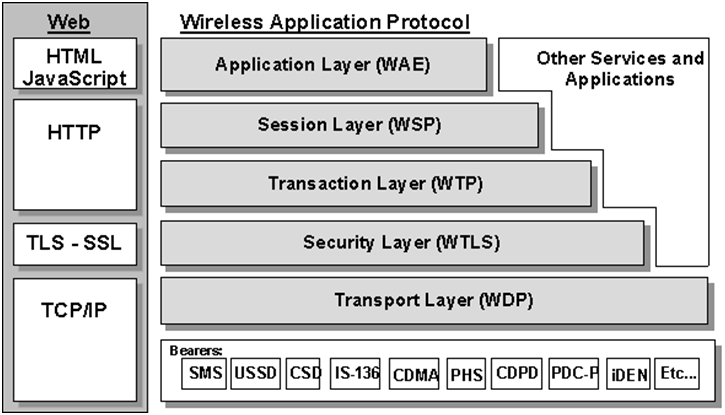
PYQ: Draw the protocol architecture of WAP. (2023, 8 marks)
The WAP architecture follows gateway-centric model that enables mobile devices to access internet content through a WAP gateway. It consists of a layered protocol stack similar to the OSI model.
The architecture consists of three main components:
- Mobile Devices: Cell phones and PDAs running the WAP protocol stack
- WAP Gateway: Middleware that translates WAP requests to standard internet protocols (HTTP, TCP/IP) and vice versa
- Acts as a bridge between WAP clients and the internet
- Handles protocol conversion, data compression, and caching
- Web/Application Servers: Standard internet servers providing content
┌──────────────────┐       ┌────────────────┐       ┌──────────────────┐
│  Mobile Devices  │◄─────►│  WAP Gateway   │◄─────►│ Internet Servers │
├──────────────────┤       ├────────────────┤       ├──────────────────┤
│   WAP Protocol   │       │    Protocol    │       │   Standard Web   │
│      Stack       │       │   Conversion   │       │    Protocols     │
│  (WML, WDP, WTP, │◄─────►│ (WAP to HTTP,  │◄─────►│  (HTTP, HTML,    │
│   WSP, etc.)     │       │ HTTP to WAP)   │       │    TCP/IP)       │
└──────────────────┘       └────────────────┘       └──────────────────┘
WAP Protocol Stack
Similar to the OSI model, WAP uses a layered protocol stack:
| Layer | Protocol | Purpose |
|---|---|---|
| Application Layer | WAE (Wireless App Environment) | Runs applications like WML, WMLScript, WTA |
| Session Layer | WSP (Wireless Session Protocol) | Manages sessions, supports dialog & connectionless services |
| Transaction Layer | WTP (Wireless Transaction Protocol) | Lightweight version of TCP for low bandwidth |
| Security Layer | WTLS (Wireless Transport Layer Security) | Ensures secure data transfer (encryption, authentication) |
| Transport Layer | WDP (Wireless Datagram Protocol) | Adapts data for various bearer networks (SMS, GPRS, etc.) |
| Bearer Layer | GSM, SMS, USSD, GPRS, CDMA, etc. | Physical layer of wireless communication |
WAP Protocol Stack
Key Protocols in WAP Stack
- WAE (Wireless Application Environment): Provides the application framework for WAP, including WML (Wireless Markup Language) and WMLScript.
- WSP (Wireless Session Protocol): Manages sessions and provides services like push and pull.
- WTP (Wireless Transaction Protocol): Provides transaction-oriented communication, similar to TCP but optimized for wireless networks.
- WTLS (Wireless Transport Layer Security): Provides security features like encryption and authentication for WAP communications.
- WDP (Wireless Datagram Protocol): Acts as the transport layer, adapting to various wireless bearer networks.
3.2 Wireless Datagram Protocol (WDP)
PYQ: Wireless Datagram Protocol (2024, 7.5 marks)
PYQ: Explain wireless transmission protocols. (2022, 8 marks)
Wireless Datagram Protocol (WDP) is the transport layer protocol in the WAP architecture that provides a datagram service for wireless networks. It is designed to work over various wireless bearer networks like GSM, CDMA, and GPRS.
Purpose of WDP
- Provides a common transport layer for different wireless networks (GSM, CDMA, GPRS, etc.)
- Ensures interoperability across various bearer networks
- Handles data packetization and fragmentation
Key Features of WDP
- Protocol Adaptation: Adapts to different underlying transport protocols (UDP, TCP)
- Datagram Service: Supports packet-based connectionless communication (similar to UDP)
- Port Addressing: Identifies applications using port numbers
- Error Detection: Basic error detection using checksums
- Fragmentation and Reassembly: Handles large messages by breaking them into smaller packets
WDP Protocol Data Units (PDUs)
- WDP PDU Format: Contains header fields for protocol identification, length, and data
- Header Fields:
- Source Port
- Destination Port
- Length of PDU
- Checksum for error detection
WDP Operation
- Data Transmission: WDP encapsulates application data into datagrams and sends them over the wireless network.
- Reception: Receives incoming datagrams, checks for errors, and delivers them to the appropriate application.
Integration with Other WAP Layers
WDP works closely with:
- WSP: Provides session management and application-level services
- WTP: Facilitates transaction-oriented communication
- Bearer Layer: Adapts to various wireless technologies for data transmission
Advantages of WDP
- Interoperability: Works across different wireless networks
- Efficiency: Lightweight protocol suitable for low-bandwidth environments
- Flexibility: Can adapt to various transport protocols
- Simplicity: Connectionless model reduces overhead
Disadvantages of WDP
- Limited Reliability: Does not guarantee message delivery (similar to UDP)
- No Flow Control: Lacks mechanisms to manage data flow
- No Congestion Control: Vulnerable to network congestion
- Packet Loss: Susceptible to packet loss in unreliable networks
3.3 Wireless Transport Layer Security (WTLS)
Wireless Transport Layer Security (WTLS) is a security layer protocol designed for wireless communication in the WAP architecture. It provides privacy, data integrity, and authentication between mobile devices and WAP gateways in the WAP protocol stack.
Purpose of WTLS
- Ensures secure communication between WAP clients and servers
- Protects data from eavesdropping, tampering, and forgery
- Supports secure transactions over wireless networks
Key Features of WTLS
- Confidentiality: Encrypts data to prevent unauthorized access
- Integrity: Verifies that data has not been altered during transmission
- Authentication: Validates the identity of communicating parties
- Session Resumption: Allows quick re-establishment of secure sessions
- Protocol Versioning: Supports multiple versions for compatibility
WTLS Protocol Data Units (PDUs)
WTLS uses specific PDUs for secure communication:
- Handshake PDU: Establishes security parameters and session keys
- Change Cipher Spec PDU: Notifies that encryption will be applied
- Alert PDU: Indicates errors or warnings in the communication
- Data PDU: Contains encrypted application data
WTLS Handshake Process
- Client Hello: Client sends a request to initiate a secure session.
- Server Hello: Server responds with its security capabilities.
- Certificate Exchange: Server sends its digital certificate for authentication.
- Key Exchange: Both parties exchange keys for encryption.
- Finished Messages: Both parties confirm the establishment of a secure connection.
Integration with Other WAP Layers
WTLS is positioned between WDP and WSP in the WAP protocol stack, providing security services for application-level protocols.
Advantages of WTLS
- Provides strong security features tailored for wireless environments
- Lightweight compared to traditional TLS/SSL protocols
- Designed to work efficiently over low-bandwidth networks
Disadvantages of WTLS
- Limited to WAP applications; not compatible with standard web browsers
- Vulnerable to certain attacks if not implemented correctly
- Requires additional processing power, which may be constrained on mobile devices
3.4 Wireless Transaction Protocol (WTP)
PYQ: Wireless Transport Protocol (2024, 7.5 marks)
PYQ: Explain wireless transmission protocols. (2022, 8 marks)
PYQ: Explain Wireless Transport Protocol. (2021, 7.5 marks)
Wireless Transaction Protocol (WTP) is the transaction layer protocol in the WAP architecture that provides reliable transaction-oriented communication for wireless applications. It is designed to work over low-bandwidth, high-latency wireless networks.
Purpose of WTP
- Provides a lightweight transaction service for WAP applications
- Supports reliable data transfer with minimal overhead
- Enables both connection-oriented and connectionless communication
Key Features of WTP
- Transaction Support: Allows multiple transactions to be grouped together
- Reliability: Ensures data delivery with retransmission mechanisms
- Flow Control: Manages data flow between sender and receiver
- Error Recovery: Handles lost or corrupted packets
- Lightweight Design: Optimized for wireless networks with limited resources
Types of WTP Transactions
| Type | Description |
|---|---|
| Class 0 (Unreliable) | One-way message, no acknowledgment (e.g., push notifications) |
| Class 1 (Reliable) | One-way reliable message with acknowledgment (e.g., message delivery) |
| Class 2 (Reliable) | Two-way reliable message with response expected (e.g., fetch request) |
WTP Protocol Data Units (PDUs)
WTP uses several types of PDUs for communication:
- Request PDU: Initiates a transaction
- Response PDU: Returns the result of a transaction
- Acknowledge PDU: Confirms receipt of a request or response
- Abort PDU: Terminates an ongoing transaction
WTP Operation
- Transaction Initiation: A client sends a request PDU to the server.
- Data Transfer: The server processes the request and sends a response PDU.
- Acknowledgment: The client acknowledges the receipt of the response.
- Error Handling: If a packet is lost, WTP retransmits it until acknowledged.
Integration with Other WAP Layers
WTP sits above WDP and below WSP in the WAP protocol stack, providing reliable transport services for application-level protocols.
Advantages of WTP
- Provides reliable communication over unreliable wireless networks
- Reduces overhead compared to traditional transport protocols like TCP
- Supports both connection-oriented and connectionless transactions
Disadvantages of WTP
- Limited to WAP applications; not suitable for general internet use
- May introduce latency due to retransmission and acknowledgment processes
- Requires additional processing power on mobile devices
WTP vs TCP
| Feature | TCP | WTP |
|---|---|---|
| Resource Usage | High | Low (lightweight) |
| Designed For | Wired networks | Wireless networks |
| Connection Setup | Three-way handshake | Optional handshake |
| Reliability | Full reliability | Selective reliability |
3.5 Wireless Session Protocol (WSP)
Wireless Session Protocol (WSP) is the session layer protocol in the WAP architecture that provides session management and application-level services for wireless applications. It is designed to facilitate efficient communication between WAP clients and servers.
Purpose of WSP
- Manages sessions between WAP clients and servers
- Supports both connection-oriented and connectionless services
- Provides mechanisms for push and pull content delivery
Key Features of WSP
- Session Management: Establishes, maintains, and terminates sessions
- Content Negotiation: Allows clients and servers to agree on content formats
- Push Services: Enables servers to send unsolicited content to clients
- Pull Services: Allows clients to request content from servers
- Header Compression: Reduces overhead for efficient data transfer
Types of WSP Services
| Mode | Description |
|---|---|
| Connection-Oriented | Runs over WTP, supports session management and reliable transmission |
| Connectionless | Runs over WDP, used for simple, short requests with no session maintenance |
WSP Protocol Data Units (PDUs)
WSP uses specific PDUs for session management:
- Connect PDU: Initiates a session with a server
- Disconnect PDU: Terminates a session
- Request PDU: Client requests content from the server
- Response PDU: Server responds with requested content
- Push PDU: Server sends unsolicited content to the client
WSP Operation
- Session Establishment: Client sends a Connect PDU to initiate a session.
- Content Request: Client sends a Request PDU to retrieve content.
- Content Delivery: Server responds with a Response PDU containing the requested content.
- Session Termination: Client sends a Disconnect PDU to end the session.
Integration with Other WAP Layers
WSP sits above WTP in the WAP protocol stack, providing session management services for application-level protocols like WML and WMLScript.
Advantages of WSP
- Efficient session management for wireless applications
- Supports both push and pull content delivery models
- Reduces overhead through header compression
Disadvantages of WSP
- Limited to WAP applications; not suitable for general internet use
- May introduce latency due to session establishment and termination processes
- Requires additional processing power on mobile devices
WSP vs HTTP
| Feature | WSP | HTTP |
|---|---|---|
| Optimized for mobile? | Yes (binary encoded headers) | No (text-based headers) |
| Connection modes | Supports both connectionless and connection-oriented | Mostly connectionless (stateless) |
| Session management | Built-in | Requires extra implementation |
| Overhead | Low | Higher |
3.6 Wireless Application Environment (WAE)
Wireless Application Environment (WAE) is the application layer component in the WAP architecture that provides an environment for developing and executing wireless applications. WAE is similar in concept to web browsers but is specifically designed for mobile devices which have limited resources and capabilities.
Purpose of WAE
- Provides a framework for developing mobile applications
- Supports content delivery and interaction over wireless networks
- Enables the use of WML (Wireless Markup Language) and WMLScript for application development
- Offers an optimized browsing experience suitable for the constraints of mobile devices.
Key Components of WAE
- WML (Wireless Markup Language): A lightweight XML-based markup language for creating web pages optimized for mobile devices.
- WMLScript: A scripting language similar to JavaScript, used to add interactivity to WML pages.
- WTA (Wireless Telephony Application): Provides telephony services and features for mobile applications.
- WAE User Agent: The client-side component that interprets WML and executes WMLScript.
WAE Architecture
The WAE architecture consists of two main components:
- WAE User Agent: Runs on the mobile device, responsible for rendering WML pages and executing WMLScript.
- WAE Server: Hosts WML content and provides services to the user agent.
┌─────────────────────┐       ┌───────────────────┐
│   WAE User Agent    │◄─────►│     WAE Server    │
├─────────────────────┤       ├───────────────────┤
   Renders WML Pages            Hosts WML Content
   Executes WMLScript           Provides Services
WAE vs Traditional Web Environment
| Feature | WAE | Traditional Web Environment |
|---|---|---|
| Language | WML, WMLScript | HTML, JavaScript |
| Optimization | For mobile (low bandwidth) | For desktops/high bandwidth |
| Device functions | Supports telephony (via WTA) | No access to phone functions |
| Image formats | WBMP (monochrome) | GIF, JPEG, PNG |
WML (Wireless Markup Language)
- Structure: Similar to HTML but designed for small screens and low bandwidth.
- Elements: Includes tags like
<card>,<p>,<a>,<img>, etc. - Structure: WML pages are organized into cards, which are similar to HTML pages but optimized for mobile devices.
- Navigation: Uses
<a>tags for hyperlinks, allowing users to navigate between cards.
Example of a simple WML page:
<wml>
  <card id="welcome">
    <p>Welcome to our mobile site!</p>
    <a href="#next">Next</a>
  </card>
</wml>
WMLScript
- Purpose: Adds interactivity to WML pages, similar to JavaScript in web pages.
- Syntax: Similar to JavaScript, with functions, variables, and control structures (if-else, loops).
- Execution: Scripts are compiled into bytecode and executed by the WAE user agent.
Example of a simple WMLScript:
extern function showAlert() {
  alert("Welcome to WMLScript!");
}
WTA (Wireless Telephony Application)
- Purpose: Provides telephony features like call control, SMS, and phonebook access.
- Components: Includes WTA User Agent, WTA Server, and WTA Interface.
- Features: Allows applications to access telephony functions such as making calls, sending SMS, and accessing the phonebook.
WAE User Agent
- Functionality: Acts as the client-side component that interprets WML and executes WMLScript.
- Rendering: Displays WML content on mobile devices.
- Interaction: Handles user input and navigates between WML cards.
3.7 Telephony Applications
Telephony Applications refer to software applications that leverage telecommunication capabilities of mobile devices, enabling features like voice calls, SMS, and other telephony services. In the context of WAP, telephony applications are built using the Wireless Telephony Application (WTA) framework.
Purpose of Telephony Applications
- Provide access to telephony features on mobile devices
- Enable users to make voice calls, send messages, and manage contacts
- Integrate telephony services with web-based applications
Key Features of Telephony Applications
- Call Control: Initiate, receive, and manage voice calls
- SMS Management: Send and receive text messages
- Phonebook Access: Manage contacts stored on the device
- Call History: View incoming, outgoing, and missed calls
- Integration with WAE: Combine telephony features with web content
WTA Architecture
The WTA architecture consists of the following components:
- WTA User Agent: Runs on the mobile device, providing the user interface for telephony functions.
- WTA Server: Hosts telephony applications and provides services to the user agent.
┌─────────────────────┐       ┌───────────────────┐
│   WTA User Agent    │◄─────►│     WTA Server    │
├─────────────────────┤       ├───────────────────┤
   Provides UI for Telephony         Hosts
Example Use Cases
- Mobile banking applications that send transaction alerts via SMS.
- Location-based services that use call control to provide navigation assistance.
- Social networking apps that allow users to share their status via SMS or voice calls.
These notes were compiled by Deepak Modi
Contact: deepakmodidev@gmail.com